Forum Discussion

Ntate209
Jul 01, 2022Copper Contributor
Help, I'm in Formula Quicksand
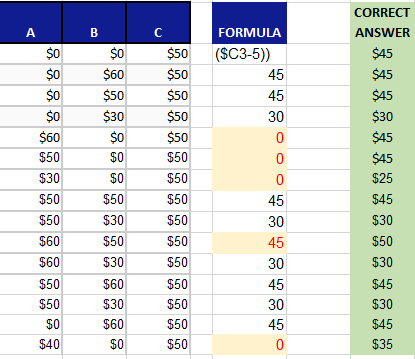
I've been trying to work on this formula and I just can't seem to get it right. I'm using an Ifs And formula where some of the answers come back correctly whereas others don't. If anyone could help...

Ntate209
Jul 05, 2022Copper Contributor
mtarler First let me say thank you so much for trying to help me! I must say, as I'm sure you can tell, this is over my head! To try to answer your question, we are trying to find the lowest unit rate which is column B but the outcome cannot be higher than or equal to the number in column B or C.

mtarler
Jul 05, 2022Silver Contributor
This doesn't probably isn't 'over your head' you just need to learn a little more about excel and take it one bite at a time. So excel offers many functions and options and we just need to know which ones to use. To figure that out, we need to understand the logic you need to perform. You say you are, "trying to find the lowest unit rate which is column B but the outcome cannot be higher than or equal to the number in column B or C." So I assume that the -5 is to make it not "higher than or equal to" and I assume you mean column A or C (not B or C). I also assume that a value of 0 should be ignored. That all said, I believe my logic was correct. So what I did is:
=LET(in,A3:C3,
minNONzero, XLOOKUP(1,SORT(in),SORT(in),,1),
IF((minNONzero=B3)*(minNONzero<MAX(in)),B3,minNONzero-5))
Line 1 set "in" to be the input row,
Line 2 then found the smallest value >0 in that set
Line 3 then checks if the smallest non-zero number (minNONzero) is the middle number (B3) AND less than the maximum of the 3 numbers and if so return the middle number (B3) and if NOT then return that minNONzero number - 5.
So please note lines 10 and 12 in your data (at least I think those are the line #s):
50 50 50 -> 45
60 50 50 -> 50
so in the 1st case because the min number = col A and col C the correct value is 45
the 2nd case is the tricky one because col B and C are equal BUT col A is bigger. In this case you say the correct value is 50. If this is not correct then I could change the formula/logic accordingly
=LET(in,A3:C3,
minNONzero, XLOOKUP(1,SORT(in),SORT(in),,1),
IF((minNONzero=B3)*(minNONzero<MAX(in)),B3,minNONzero-5))
Line 1 set "in" to be the input row,
Line 2 then found the smallest value >0 in that set
Line 3 then checks if the smallest non-zero number (minNONzero) is the middle number (B3) AND less than the maximum of the 3 numbers and if so return the middle number (B3) and if NOT then return that minNONzero number - 5.
So please note lines 10 and 12 in your data (at least I think those are the line #s):
50 50 50 -> 45
60 50 50 -> 50
so in the 1st case because the min number = col A and col C the correct value is 45
the 2nd case is the tricky one because col B and C are equal BUT col A is bigger. In this case you say the correct value is 50. If this is not correct then I could change the formula/logic accordingly
- Ntate209Jul 05, 2022Copper ContributorI've never used the LET function before so I've got some studying to do. In the 2nd case (60,50->50) I was incorrect, the outcome really should be 45, everything else was correct.
- mtarlerJul 05, 2022Silver Contributor
Ntate209 so I believe that makes things easier as you just need the min >0 number when you -5 to columns A and C. Try this:
=XLOOKUP(1,SORT(A3:C3-{5,0,5}),SORT(A3:C3-{5,0,5}),,1)In the attached I updated the formula and updated the dynamic array version also.
- Ntate209Jul 05, 2022Copper ContributorThank you so much! You're a lifesaver!