Forum Discussion

excelzero
Jul 01, 2024Copper Contributor
Help: Creating a List Based on Two Values From a Data Set
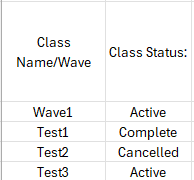
Hi! Struggling with a rather basic issue: I need to pull the name of a class in a list based on "Active" status. Here is how the data is laid out now: I want to be able to have a formula find ...
 Jul 01, 2024
=INDEX($A$2:$A$5,SMALL(IF($B$2:$B$5="Active",ROW($B$2:$B$5)-1),D2))
This formula works in my sample file. The formula must be entered as an arrayformula with ctrl+shift+enter if someone doesn't work with Office 365 or Excel for the web or Excel 2021.
OliverScheurich
Jul 01, 2024Gold Contributor
=INDEX($A$2:$A$5,SMALL(IF($B$2:$B$5="Active",ROW($B$2:$B$5)-1),D2))
This formula works in my sample file. The formula must be entered as an arrayformula with ctrl+shift+enter if someone doesn't work with Office 365 or Excel for the web or Excel 2021.

excelzero
Jul 01, 2024Copper Contributor
This worked, thanks! Had an iddue with it picking Select instead of Active, but changed the -1 to -2 and it's working accurately! Thanks again!