Forum Discussion

Help analyzing data
 Oct 05, 2018
Hi Bruce,
There is no specific name for such an output!
You can call it whatever you want, like:
- Check table
- In-stock/Out-of-stock table
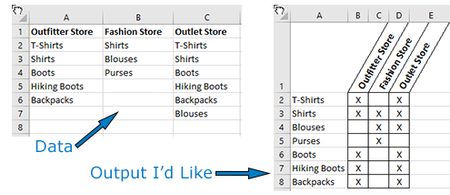
To get a table like it, create a unique list contains each clothing type, then place the names of the stores as headers for this table as shown in the below screenshot.
After that, use this formula in cell B2 and copy it down and to the right:
=IF(COUNTIF(Data!A$2:A$7,$A2),"X","")
Please find the attached file
Hope this helps you
Hi Bruce,
There is no specific name for such an output!
You can call it whatever you want, like:
- Check table
- In-stock/Out-of-stock table
To get a table like it, create a unique list contains each clothing type, then place the names of the stores as headers for this table as shown in the below screenshot.
After that, use this formula in cell B2 and copy it down and to the right:
=IF(COUNTIF(Data!A$2:A$7,$A2),"X","")
Please find the attached file
Hope this helps you