Forum Discussion

Help - Cancel MsgBox If Condition is Met
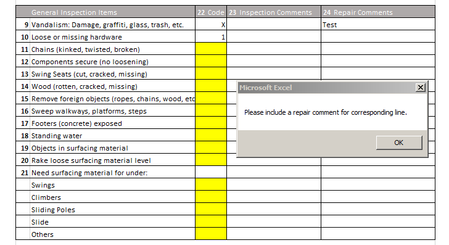
- May 02, 2019
Hello ACPNR ,
I think all you need to do is add another condition to the IF statement so it says in words "If the Code is X and the cell next to it is blank" then show the message.
You only need to loop through the codes in column H, and you don't need the $ signs in the range reference. Also, when you dim several elements in one row of code, you need to specify the data type of each. If you don't, it will be a variant.
Also, you don't want to loop through the whole list. You only want to check the row where the data was entered, i.e. the target cell in column H. Therefore, the code should only watch column H, not column I. When you operate on the target cell, you don't need to declare any ranges at all.
Private Sub Worksheet_Change(ByVal Target As Range)
    If Not Intersect(Target, Range("H15:H32")) Is Nothing Then
        If Target.Value = "X" And Len(Target.Offset(0, 1)) = 0 Then
                MsgBox ("Please include a repair comment for corresponding line.")
        End If
    End If

End Sub
If you want to cater for a scenario where several rows of values are filled in at once, for example with a copy / paste operation, THEN you would need to loop through all the cells in the target. In that case it would also help to give the user an indication which row needs to be addressed.
Private Sub Worksheet_Change(ByVal Target As Range)
Dim cel As Range
    If Not Intersect(Target, Range("H15:H32")) Is Nothing Then
        For Each cel In Target
            If cel.Value = "X" And Len(cel.Offset(0, 1)) = 0 Then
                    MsgBox ("Please include a repair comment for row " & cel.Row & ".")
            End If
        Next cel
    End If

End Sub

Hello ACPNR ,
I think all you need to do is add another condition to the IF statement so it says in words "If the Code is X and the cell next to it is blank" then show the message.
You only need to loop through the codes in column H, and you don't need the $ signs in the range reference. Also, when you dim several elements in one row of code, you need to specify the data type of each. If you don't, it will be a variant.
Also, you don't want to loop through the whole list. You only want to check the row where the data was entered, i.e. the target cell in column H. Therefore, the code should only watch column H, not column I. When you operate on the target cell, you don't need to declare any ranges at all.
Private Sub Worksheet_Change(ByVal Target As Range)
    If Not Intersect(Target, Range("H15:H32")) Is Nothing Then
        If Target.Value = "X" And Len(Target.Offset(0, 1)) = 0 Then
                MsgBox ("Please include a repair comment for corresponding line.")
        End If
    End If

End Sub
If you want to cater for a scenario where several rows of values are filled in at once, for example with a copy / paste operation, THEN you would need to loop through all the cells in the target. In that case it would also help to give the user an indication which row needs to be addressed.
Private Sub Worksheet_Change(ByVal Target As Range)
Dim cel As Range
    If Not Intersect(Target, Range("H15:H32")) Is Nothing Then
        For Each cel In Target
            If cel.Value = "X" And Len(cel.Offset(0, 1)) = 0 Then
                    MsgBox ("Please include a repair comment for row " & cel.Row & ".")
            End If
        Next cel
    End If

End Sub
 ACPNRMay 06, 2019Copper Contributor
I tried the first code you wrote, but it didn't work properly. I understand what you mean though. However, I still get the message box popping up even if the repair comments are filled.
- May 06, 2019
ACPNR the code I wrote will not pop up for every row. Post the code you are using.
- ACPNRMay 06, 2019Copper Contributor
I also edited the original post with a photo when I edit another row within the range and get the pop up message despite having the other cell filled in. It seems to ignore the second condition for some reason.
This is the code:
Private Sub Worksheet_Change(ByVal Target As Range)
If Not Intersect(Target, Range("H15:I32")) Is Nothing Then
Dim Code As Range
For Each Code In Range("H15:H32")
If Code.Value = "X" And Len(Target.Offset(0, 2)) = 0 Then
MsgBox ("Please include a repair comment for corresponding line.")
End If
Next Code
End If
End Sub