Forum Discussion

Grouping data sourced from another sheet in that workbook.
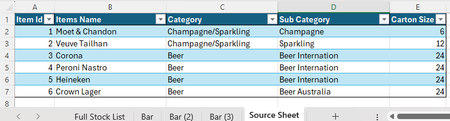

I appreciate your help, however still stuck on a couple of points!
I have the Bar sheets as I actually have 15 bars and over 300 products. i have just made this small version as its easier to play around with while I try fixing everything.
For the Source Sheet. The goal is to have one sheet with all my products that I can edit, that will automatically update the other sheets to avoid things missing.
As for everything else, I have never used XLOOKUP so thank you for showing it to me though I haven't quite worked it out exactly! I have managed to add it to the Bar columns in Full Stock list, but not Grand Total column. But then when sorting the values become N/A
Sorry, I am trying to learn haha

Your lookup formula is looking at single cells for the lookup and return ranges (i.e. get rid of the @ in the lookup range and in the return range). It should look like:
=XLOOKUP([@[Item Id]], Bar[Item Id], Bar[Total])
TIP when entering the formula you can click on the corresponding Item Id cell and it should automatically add the @ version and then when you want the Item Id range on the Bar tab you go there and hover over the header of that column and when the cursor turns to a down arrow you click and it should give you the whole column.