Forum Discussion

misty_trevino
Jan 27, 2022Copper Contributor
Go to Matching cell, then next empty cell in the row
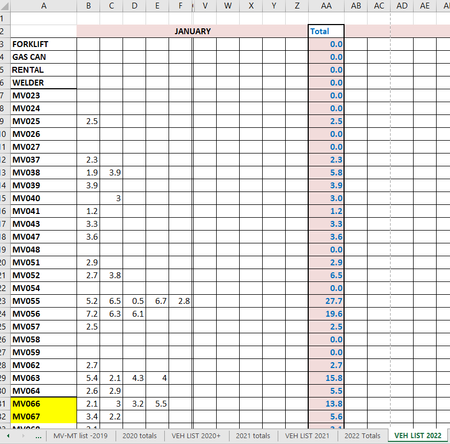
I have to track how much fuel some of the units in our fleet use and I inherited a clunky excel workbook to do this in. I was able to do the basic SUM functions and pull the totals into a worksheet t...
- Jan 27, 2022so first of all, cell formulas will not move the cursor and will not move data. Cell formulas only perform a calculation to be displayed in that cell (or range).
In your application I would recommend numbering the days across (1-31) and enter the data in THAT corresponding day instead of using the next open cell.
A) this will make it easier to enter your data (you just go down today's column and enter the data as needed
B) it makes it easier to check your work (you go down todays column to see if the numbers match up with todays data
C) it can help with auditing (e.g. you can look and see patterns of when different vehicles are getting gas
D) it can help prevent errors. What if someone accidently writes MV052 instead of MV025 and therefore you have 2 entries for MV052 that day. In your orig way you may just enter it 2x on that row (next cell, and then next cell) and not even realize. But if you have to enter it on TODAY's column you would see that you already entered a number on that day for that vehicle.

mtarler
Jan 27, 2022Silver Contributor
so first of all, cell formulas will not move the cursor and will not move data. Cell formulas only perform a calculation to be displayed in that cell (or range).
In your application I would recommend numbering the days across (1-31) and enter the data in THAT corresponding day instead of using the next open cell.
A) this will make it easier to enter your data (you just go down today's column and enter the data as needed
B) it makes it easier to check your work (you go down todays column to see if the numbers match up with todays data
C) it can help with auditing (e.g. you can look and see patterns of when different vehicles are getting gas
D) it can help prevent errors. What if someone accidently writes MV052 instead of MV025 and therefore you have 2 entries for MV052 that day. In your orig way you may just enter it 2x on that row (next cell, and then next cell) and not even realize. But if you have to enter it on TODAY's column you would see that you already entered a number on that day for that vehicle.
In your application I would recommend numbering the days across (1-31) and enter the data in THAT corresponding day instead of using the next open cell.
A) this will make it easier to enter your data (you just go down today's column and enter the data as needed
B) it makes it easier to check your work (you go down todays column to see if the numbers match up with todays data
C) it can help with auditing (e.g. you can look and see patterns of when different vehicles are getting gas
D) it can help prevent errors. What if someone accidently writes MV052 instead of MV025 and therefore you have 2 entries for MV052 that day. In your orig way you may just enter it 2x on that row (next cell, and then next cell) and not even realize. But if you have to enter it on TODAY's column you would see that you already entered a number on that day for that vehicle.
 misty_trevinoJan 31, 2022Copper Contributor
mtarler Thanks very much for the great suggestions. I think I will put those to good use. It will definitely help with checking my work and verifying the entries daily.