Forum Discussion

Tahoe24x7
Oct 14, 2025Copper Contributor
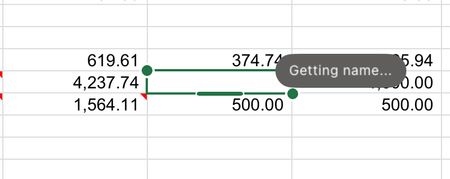
"Getting Name" bug on my worksheet
One of the cells in my worksheet has a "Getting Name" bug on my worksheet - I have no idea what this is referring to - I've never seen this in my 40-years of using Excel - there are no Range Names no...

SarahWilson1
Aug 12, 2026Brass Contributor
This is not a named-range or formula error. The green outline and Getting name... label indicate that Excel is trying to retrieve the identity of a co-author associated with that selection. It can remain stuck when a OneDrive or SharePoint editing session is no longer active or Excel cannot reach the identity service.
Try the following:
- Save the workbook and close it on every computer, browser and mobile device where it may be open.
- Wait for OneDrive to finish syncing, then reopen the workbook.
- Check the user icons in the upper-right corner of Excel for another active or stale editing session.
- If it remains, choose File > Save a Copy, save the workbook to a local folder and open that copy with AutoSave turned off.
If the local copy does not show the label, the workbook data is fine and the issue is with cloud co-authoring or presence information. Signing out of Office, restarting Excel and signing back in can refresh it. Also install the latest Office updates if it continues returning.
 JudgeJefferies1Nov 04, 2026Occasional Reader
Simple solution is to close Excel having saved activity and reopen same document. 'Getting Name' disappears.