Forum Discussion

"Getting Name" bug on my worksheet
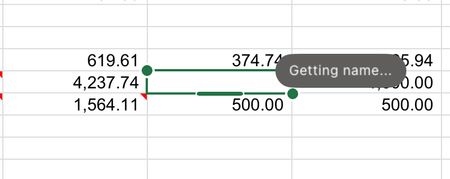

I've got the same. It's not associated with an actual cell, it's just a floating icon with a little "person" icon, and when I hover over it, it expands and says "Getting name...". It wasn't there when I was editing this file this morning. I've come back from work and voila... I have the same little floating icon. I've also never seen this before.
I'm using Desktop Win11 Excel build 2811:
- This is my own file, stored on my own OneDrive. It's not shared, there are no other users, so it's not an multi-user indicator of another user.
- The cells anywhere near the icon don't have any formula.
- I have zero Office plugins/extensions.
- It doesn't matter which cell is selected.
- There are no "Named Ranges" on this sheet, or in the Workbook.
- There are no linked-lists or as far as I can tell, anything at all that has a "Name".
 Lobo360Dec 13, 2025Brass Contributor
Could it be that you have another session open somewhere? The “ghost” could be you, where you left another session of excel running, whether web or teams view maybe?
- Vexen_CDec 13, 2025Brass Contributor
Nah, it's a new workbook I've been working on for a week, created on my desktop, and developed purely in a single open instance of Excel. I done a bit of work on it in the morning, returned after work yesterday, and voila, there it was with a little icon seeking a 'name'.