Forum Discussion

Getting data from one column that match criteria to other columns?
- Sep 07, 2021
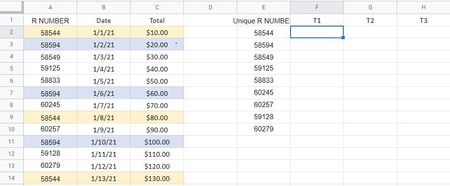
So this isn't exactly what you requested, but it's a simple solution that is elegant in that only one formula is needed for filling in each row. It uses the very new FILTER function, and as such requires the newest versions of Excel to operate.
I sorted your database in date order, first.
Then used the UNIQUE function to list the unique R numbers
Then this formula
=TRANSPOSE(
FILTER($C$2:$C$14,($A$2:$A$14=D2),"None")
)
The FILTER function in this case just gets every row in the database, in order (in this case, in date order), for each R number. Because FILTER is one of the "Dynamic Array" functions released in the last year, it will list every row of a database that meets the criteria. In this case, the only criterion I used was that of matching the R number.
TRANSPOSE just arrays what would have been a display cascading down "n" rows, and puts them across the columns.
An aside: Before I did this, I did write a FILTER function that first got the minimum date or the maximum date and combined that with the FILTER that got the rows that matched the R number. This worked for T1 and T3 for these two that had three instances; but it was "less elegant"--different formula for each instance--and I'm not sure added value.
Here, if you've not seen them, is an excellent YouTube video from Microsoft in which they introduced the Dynamic Array functions. https://www.youtube.com/watch?v=9I9DtFOVPIg


So this isn't exactly what you requested, but it's a simple solution that is elegant in that only one formula is needed for filling in each row. It uses the very new FILTER function, and as such requires the newest versions of Excel to operate.
I sorted your database in date order, first.
Then used the UNIQUE function to list the unique R numbers
Then this formula
=TRANSPOSE(
FILTER($C$2:$C$14,($A$2:$A$14=D2),"None")
)
The FILTER function in this case just gets every row in the database, in order (in this case, in date order), for each R number. Because FILTER is one of the "Dynamic Array" functions released in the last year, it will list every row of a database that meets the criteria. In this case, the only criterion I used was that of matching the R number.
TRANSPOSE just arrays what would have been a display cascading down "n" rows, and puts them across the columns.
An aside: Before I did this, I did write a FILTER function that first got the minimum date or the maximum date and combined that with the FILTER that got the rows that matched the R number. This worked for T1 and T3 for these two that had three instances; but it was "less elegant"--different formula for each instance--and I'm not sure added value.
Here, if you've not seen them, is an excellent YouTube video from Microsoft in which they introduced the Dynamic Array functions. https://www.youtube.com/watch?v=9I9DtFOVPIg
- BrucePerezSep 07, 2021Copper ContributorThank you very much for this solution and for the explanation too, much appreciated. It is fantastic.!
- mathetesSep 07, 2021Gold ContributorGlad you liked it. It was fun coming up with it; I'd never used the TRANSPOSE function before, so seeing how it added to what FILTER can do, a function that I've come to love in many other instances as well.
- DKoontzSep 07, 2021Steel ContributorThis is a great solution!
