Forum Discussion

ssuuzzeeqq
Jan 24, 2025Copper Contributor
get count from multiple rows in one cell by unique identifer
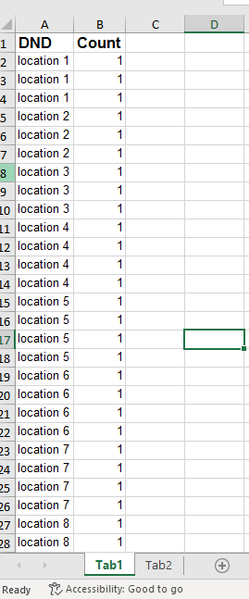
I have a tab "Tab1" with a column named DND that has multiple rows with the same cell data. See my pictures, for example there are three lines for "location 1". I need to count the totals in the "Cou...

HansVogelaar
Jan 24, 2025MVP
Option 1: create a pivot table based on the data in Tab1. See Pivot Tables in Excel if you're not familiar with this feature.
Option 2: in B2 on Tab2:
=SUMIFS(Tab1!$B$2:$B$100, Tab1!$A$2:$A$100, A2)
Fill down to B10.
Option 3, if you have a fully updated Microsoft 365: in B1 on Tab2:
=GROUPBY('Tab1'!A1:A100, 'Tab1'!B1:B100, SUM, 3)