Forum Discussion

Cyndie_Birdsong
Nov 07, 2020Copper Contributor
Get congruent cell counts with same value.
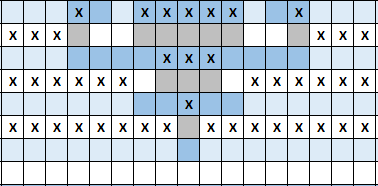
I am trying to figure out how to get a total count of congruent cells with the same value in each row. (the color doesn't matter, just whether there's an X or empty cell) I need to create text that w...

HansVogelaar
Nov 07, 2020MVP
Press Alt+F11 to activate the Visual Basic Editor.
Select Insert > Module.
Copy the following code into the module:
Function Describe(rng As Range) As String
    Dim i As Long
    Dim f As Boolean
    Dim n As Long
    Dim s As String
    n = 1
    f = (rng(1).Value <> "")
    For i = 2 To rng.Count
        If rng(i).Value = "" Then
            If f Then
                s = s & ", " & n & " X cell" & IIf(n = 1, "", "s")
                f = False
                n = 1
            Else
                n = n + 1
            End If
        Else
            If f Then
                n = n + 1
            Else
                s = s & ", " & n & " empty cell" & IIf(n = 1, "", "s")
                f = True
                n = 1
            End If
        End If
    Next i
    If f Then
        s = s & ", " & n & " X cell" & IIf(n = 1, "", "s")
    Else
        s = s & ", " & n & " empty cell" & IIf(n = 1, "", "s")
    End If
    Describe = Mid(s, 3)
End Function
Switch back to Excel.
Let's say the first row with data is A1:Q1.
In another cell in row 1, for example R1, enter the formula
=Describe(A1:Q1)Fill or copy down.
Save the workbook as a macro-enabled workbook (.xlsm).
Make sure that you allow macros when you open the workbook.
 Cyndie_BirdsongNov 07, 2020Copper Contributor
HansVogelaar It worked like a charm! Thanks so much!! 🙂
- Cyndie_BirdsongNov 07, 2020Copper Contributor
HansVogelaar Thanks a lot!! I'll give it a try & let you know how it goes. I appreciate your quick reply!! 🙂