Forum Discussion

FREQUENCY() bug or floating point error?
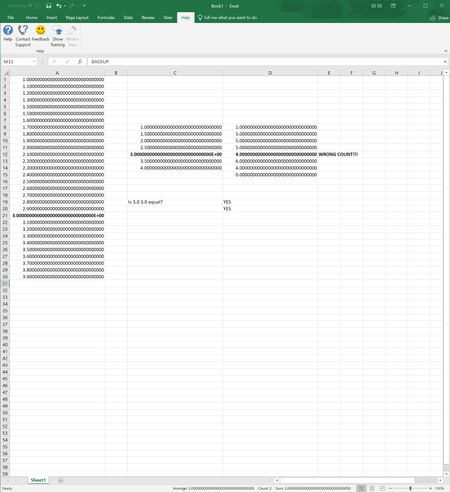
- Jun 17, 2019
When I save the workbook and look into the XML data I see numbers like this:
1.1000000000000001
1.3000000000000003
1.5000000000000004
2.2999999999999998
3.9000000000000026
Definitely floating point error.

That's floating point error, but it's not clear, at least for me, why in FREQUENCY. Equivalent formulas like
=COUNTIFS($A$1:$A$30,"<="&C8,$A$1:$A$30,">"&C7) or
=COUNTIFS($A$1:$A$30,"<="&C8:C14,$A$1:$A$30,">"&C7:C13)  as CSE

=SUMPRODUCT(($A$1:$A$30<=C8)*($A$1:$A$30>C7))
etc., all return correct result on this sample, and only FREQUENCY is affected.

The reason for this could be how the numbers are processed in the different functions.
At least COUNTIFS() is known to cut numbers after 15 decimal places.
Ah, found something in my archive:
Calc Bug Due to 17 Digits of Precision
Thanks to MrExcel for solving the case.
- SergeiBaklanJun 17, 2019Diamond Contributor
Detlef, thank you for the links (and Bill with Jan Karel for the investigation and explanation of the issue), I had no idea about this before. Here https://sfmagazine.com/post-entry/august-2017-excel-rank-countif-and-floating-point-errors/ is bit more in conclusion part.
In general, using of different precision for SORT, RANK and FREQUENCY is kind of design bug. As well as considering 1900 as leap year and wrong using of negation with exponentiation http://mathforum.org/library/drmath/view/69058.html