excel
43525 Topics
Variable "Connecting to Datasource" Load times
Hello, I am running into a strange issue that I am not sure how to solve. I am using Power Query to link to external Excel data files/Sheets and then I process the data within Power Query and also have some Macros that run after the data is refreshed. I am seeing a drastic difference in the amount of time it takes separate users to open/refresh this file (the users have the same internet connection, use the same link to the file on a Shared Drive on our servers, same Excel settings, and have the same hardware). Some users can load and run all Macros in < 15 seconds, while the others take > 10 minutes. I have exhausted all possible causes/reasons that I can think of and am looking for some guidance. Any and all suggestions are appreciated! Thanks, Skywalker_9Views0likes1Comment
Top n vs. Others in Excel
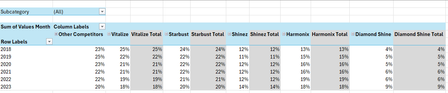
Hi all, I'm seeking some help because I'm kind of new to the more intermediate stuff in Excel. I have an Excel table with the following columns: Subcategory in column A, Brand in column B, Region in column C, Year in column D and Values Month in column E. I want to create a PivotTable and a Pivot line chart from this PivotTable that ranks the Top 5 Brands vs. Other Competitors by each region. For added context: There are 5 subcategories, 3 regions and 25 brands. Currently, I've tried grouping the remaining 20 brands as "Other Competitors" vs. the Top 5 brands within a selected region and possibly all regions (when no selection is made). I'm seeking a solution similar to this... Please mind the colours. I will sort those out later. But, the problem that I'm faced with is that upon selection of a region, the PivotTable won't update to the Top 5 brands of a selected region because they've already been grouped. How can I make this more dynamic so that I'm able to show The Top 5 brands vs. Others? Please help. EDIT: My operating system is Windows 10 (64-bit) and I use Excel 365 (Desktop version). For reference, I've attached a link to a sample file. https://1drv.ms/x/c/b2d878e32a062614/IQC1wcnwLICcQasOfnGcwKn0ASjpXp9xQ6rjnOP10Jal5cc?e=HaXEWd Thank you all once again.Solved240Views2likes9CommentsHelp with data and visuals
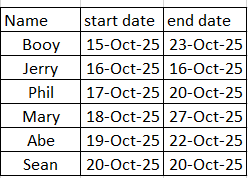
I hope i can explain this right, i have data that shows 3 things: person, start date and end date: now i need excel to take this information and represent it as the following in the month tracker: It would look for the charts and figure out the timeline and add them to a row with the timeframe: example is Booy 15-0ct-25 to 23-oct-25 the char would go to the next one and add his information, I hope someone can help me. I just need it to populate the month tracker, Thanks175Views0likes4CommentsSummary sheet, copy entire row if a cell criteria is met
https://arengio-my.sharepoint.com/:x:/g/personal/melanie_stokes_areng_io/IQC2OhPfZnKEQL6qfPj11gqfAQSh8Em3Zp95fkYbLBTZc3g?e=oNU1pEHi Can you please help me, I have a schedule for jobcards, each tab is a book that is given to someone, if that specific jobcard is invoices, then in column T where it says "Incomplete", I want that entire row to be copied to the "Outstanding Jobcards"tab. As a new book is handed out, a new tab is create and the tab is named according to the book sequence. This is updated daily as jobcards are being invoiced.4Views0likes0Comments
Dynamic array formula call with spill range input parameter crashes Excel; legacy array call works
Hi, I have a workbook with a dynamic range formula call referencing a spill range that worked last week but is suddenly causing excel to crash this week when using a full worksheet re-calc on a specific machine. This workbook works on multiple other machines but something on that machine is causing this formula to break. 1) Excel version is 2211 (Build 15831.20208 Click-to-run). I have tried an excel repair already on that specific machine. 2) Shift+F9 on the offending worksheet hangs excel with the status bar showing: "calculating (spill resize pass 1)" stuck at 66%. Pressing escape allows me to regain control, but a subsequent Shift+F9 crashes the excel process entirely. 3) The legacy Ctrl+Shift+Enter method of using the formula with a defined output range allows Shift+F9 to work on that worksheet without any issue. 4) Calculating the rest of the page separately without the offending formula, then inputting the offending dynamic range formula also works. 5) Other machines on the identical version of Excel recalculate the sheet instantaneously. 5) I've tried to disable things such as endpoint security services to no avail. Is there anyone who has encountered this behavior before and/or can tell me how to diagnose better the issue?3KViews0likes5CommentsDisplay Last Value in Column when certain criteria match
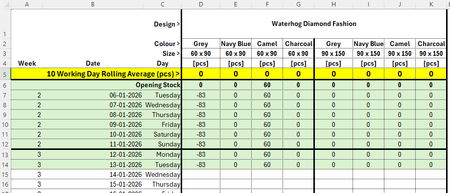
Hello all, I am trying to find a way of displaying the last value in a column when certain criteria match... Criteria that need to match would be Design, Colour and Size, so the quantity column would populate with the latest stock quantity: Thanks all! Michael77Views0likes3Comments
Help with Excel Sorting
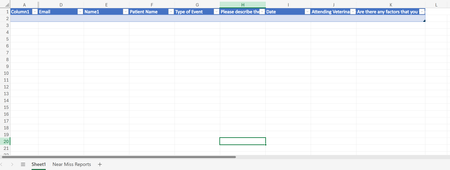
Hello! I am looking for help with sorting data on a sheet with form responses to different excel sheets. I want to filter by column G to different sheets ("Near Miss", "Adverse Event", "Sentinel Event". The data automatically goes to sheet1 via form responses, but I am trying to streamline the data into specific types of events. I'm using office 365. TIA!31Views0likes1CommentHow do you respond to...
Hello my Excellers, I wish you all a happy new year full of great things. I have a question and I am not sure if this is a purely an Excel question or something else but maybe I start here and see how it goes: As you all may have noticed the AI craze is blooming like crazy. If you want to sell lettuce slap AI on its label and step back. I use Bing to search for VBA examples. For example I typed "excel vba code to find cells with formulas" and I get AI to find or "compose" a decent example that with minimal editing will work perfectly. But then at the end of the code and its explanation I sometimes find these kind of questions: "If you want to list the addresses of formula cells instead of highlighting them, I can give you a version that outputs them in the Immediate Window or a new sheet. Do you want me to provide that listing version as well?" How do you say YES I want that code that would list the addresses in a sheet? I see buttons like "Undo" rounded Left Arrow, or "Redo" rounded Right arrow, and a "Copy, "Export", and then "Tweak Content", "Rewrite" button, A "Testing Tools" dropdown with options like "Generate test data" and "Integrate test cases", and another dropdown called "More Actions" with options like "Perform code review", "Explain the code", "Add error handling", and "Make code compliable" and the last dropdown "Work Report" with its own options. But I do not see anything that would allow me to say YES I want that code that would list the addresses in a sheet? Thanks for any insight... GiGi43Views0likes1CommentSaved CSV opens with dates even when saved as text
Hi, New to the page, have a problem with a CSV file that has hyphenated numbers which turns into dates when opened after being saved as text. How do I make sure that the changes made in the columns stay as text so it doesn't revert back to date or custom format? I know this topic is talked about in this forum and I can change it to text when I open it but the issue is I have to upload it into accounting software and think that it is defaulting when I save the file. Have tried importing the data into a CSV file and that doesn't seem to work and also got some code from an AI platform to put into the Visual Basic program to try and stop it but didn't seem to work. Any help would be much appreciated. Brian 4-1000 Income 4-1025 Income Apr-00 Income4Views0likes0Comments