Forum Discussion

Formulas in tables changes language automatically when inserting new row
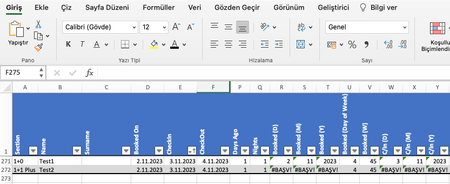

It seems that Excel might be trying to change the formulas to a different language based on the operating system or regional settings. If you are sure your settings are consistent across devices, here is an approach that might resolve the issue:
- Check the Formula Locale Settings:
- Confirm that the formula language settings are consistent on your Mac and iPhone.
- In Excel for Mac, check the language settings under Excel -> Preferences -> International.
- On your iPhone, verify the system language settings that might affect Excel formulas.
- Convert to English Formula:
- One potential solution is to use English formulas that work universally across devices. For instance, use DAY(), MONTH(), and YEAR() instead of the Turkish counterparts (GÜN(), AY(), YIL()).
- Check Table Options:
- In Excel for Mac, verify the Table options for any specific language or formula settings that might be affecting the table's behavior.
- Excel Version and Updates:
- Ensure you are using the latest version of Excel on both your Mac and iPhone.
- If there's a specific issue tied to the application's version or updates, checking for available updates might resolve the problem.
If the problem persists despite these checks, it might be worthwhile to reach out to Microsoft Support or Excel support forums to address the issue. They might have specific troubleshooting steps or insights based on the behavior of the formulas.
NOTE: My knowledge of this topic is limited, but since no one has answered it for at least one day or more, I entered your question in various AI. The text and the steps are the result of various AI's put together. Maybe it will help you further in your project, if not please just ignore it.
My answers are voluntary and without guarantee!
Hope this will help you.
Was the answer useful? Mark as best response and Like it!
This will help all forum participants.