Forum Discussion

Formulas and Functions
Hello, can someone please help me with the proper formula for the below scenario?
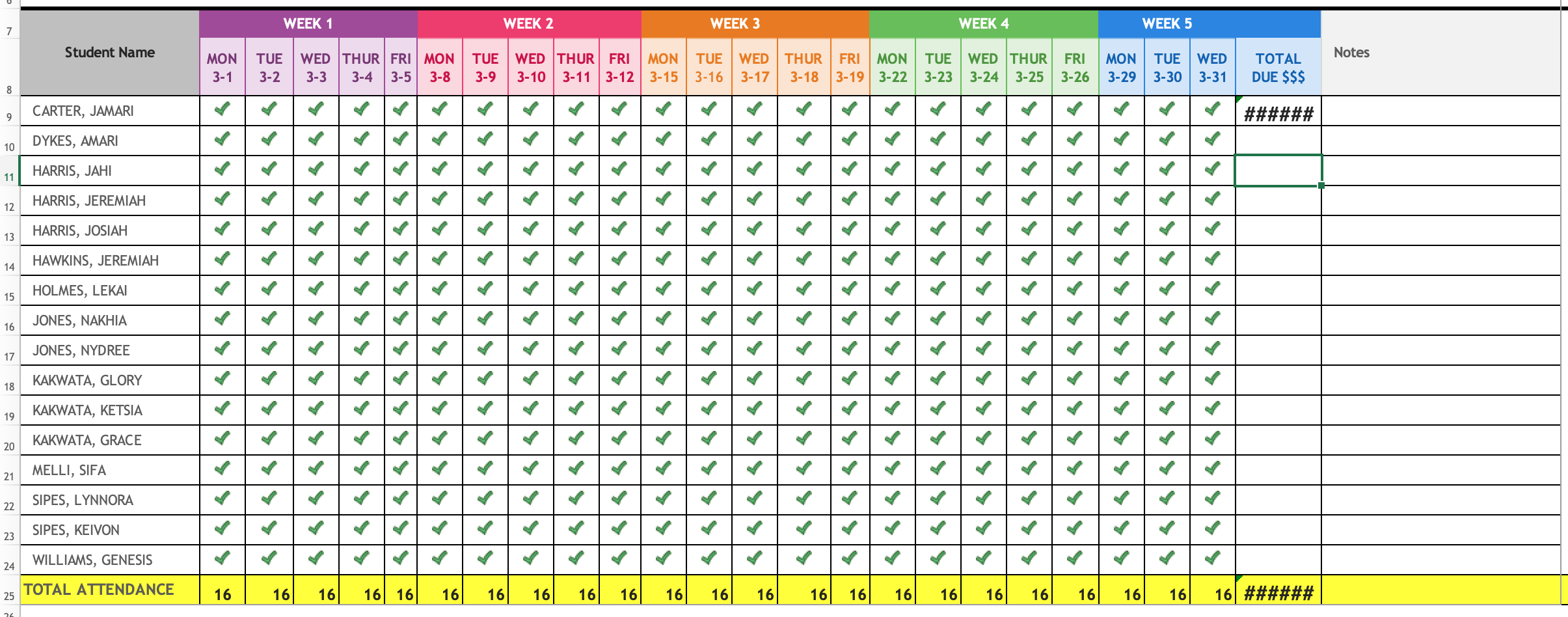
I used a Tick symbol as the value. I am tracking student attendance.
I would like to know the total Sum for each row. Each row represents a student.
For example, there are 31 Tick symbols on row 9 (columns A thru Y).
Each Tick symbol represents $5.00 per day.
I have tried multiple formulas. The below is the latest formula I tried.
=SUM(LEN(A9:Y9*5))

5 Replies
- peteryac60Iron Contributor
Hi
Attached is a possible solution - you count the blanks (using the COUNTBLANK function) rather than the tick symbols and then use the number for the calculation.
hope this helps.
Peter
 Gmema2uCopper ContributorHi peteryac60, another Member shared the below formula with me which worked. Yeah. Thanks for your reply.
Here is the formula: =SUMPRODUCT(LEN(A9:Y9))*5
- Gmema2uCopper ContributorIt worked! Yeah!!! Thank you so very much!
- Riny_van_EekelenPlatinum Contributor
Gmema2u Try this:
=SUM(LEN(A9:Y9)*5)Not sure though why you chose to use tick marks. Why not just a number 1. So much easier to calculate with numbers.