Forum Discussion

Aaron Lockett
Feb 14, 2018Brass Contributor
Formulas and Functions
Please Help - I'm no Excel expert!!
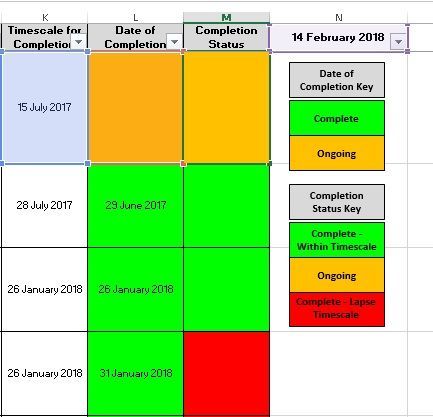
I am trying to improve a log of audit actions, more specifically their timescales for completion.
This is the formula I currently have in Cell M2:
=I...

SergeiBaklan
Feb 16, 2018Diamond Contributor
Hi Aaron,
Thank you for the sample. Thus you need 4 rules, one for each color, and sequence of rules matter. The logic could be
First we check if K is empty and white the cell if so
=$K2=""
Second we check if L is not empty and less than K, green that
=($L2<=$K2)*($L2>1)
Third we check for L is not empty if K less than today OR L more than K or today, red then
=OR(($K2>1)*($K2>=TODAY()),OR($L2>$K2,$L2>=TODAY()))*($L2<>"")
Last rule we check if L is empty or K less than today, orange it
=OR($L2="",($K2>1)*($K2<TODAY()))

Aaron Lockett
Feb 16, 2018Brass Contributor
Thank you for that Sergei
How will these rules translate into one formula?
Am I on the money with:
=$K2="",=($L2<=$K2)*($L2>1),=OR(($K2>1)*($K2>=TODAY()),OR($L2>$K2,$L2>=TODAY()))*($L2<>""),=OR($L2="",($K2>1)*($K2<TODAY()))
How will these rules translate into one formula?
Am I on the money with:
=$K2="",=($L2<=$K2)*($L2>1),=OR(($K2>1)*($K2>=TODAY()),OR($L2>$K2,$L2>=TODAY()))*($L2<>""),=OR($L2="",($K2>1)*($K2<TODAY()))
- SergeiBaklanFeb 16, 2018Diamond Contributor
Aaron, do you mean to use exactly the same formula for all rules?
- Aaron LockettFeb 16, 2018Brass ContributorI mean how do I translate the rules you have stipulated into a formula for Column M - What is the exact formula I need to enter into Column M to produce my intended outcome?
TIA- SergeiBaklanFeb 16, 2018Diamond Contributor
I missed what if L is empty and K > today() that shall be red.
Combined formula could be
=IF($K2="","D",
   IF( ($L2>1)*AND($L2<=TODAY(),$L2<=$K2),"G",
      IF(OR(($L2>1)*OR($L2>TODAY(),$L2>$K2),($K2>TODAY())), "R", "A"
   )
))
and in any case you need the letters rules could be as
=IF(as above) = "D"
and so on for each color