Forum Discussion

JenSmith
Feb 13, 2020Copper Contributor
Formula/Formatting to populate adjacent cell based on initial cell contents
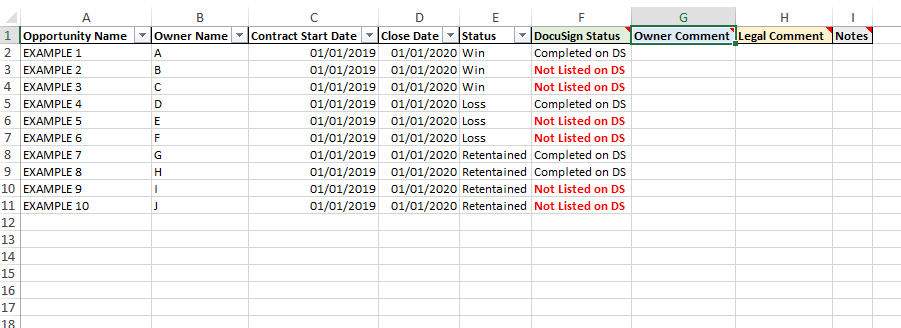
Hi Everyone, I am creating a template for a report we are developing and i'm trying to add as many 'tricks' in the background as possible to make it easy for all involved and reduce the amount o...
- Feb 13, 2020As long as the data validation list includes “N/A” and the “Statement if true” from the second if statement, then yes, this would work whilst having a drop down in the same cell.
However... as soon as an option is chosen from the data validation list the formula would be removed from the cell.
I would recommend keeping the drop down and formula in separate cells.

PReagan
Feb 13, 2020Bronze Contributor
Hello JenSmith,
Perhaps this might be what you're looking for:
In cell G2...
=IF($F2="Completed on DS","N/A",IF($F2="Not Listed on DS","Statement if true",0)) Copy over to H2 and down as necessary.
- JenSmithFeb 13, 2020Copper Contributor
Hi PReagan ,
Thank you for your response!
Would this work whilst also having drop down options for all cells in columns G & H?
Thanks,
Jen- PReaganFeb 13, 2020Bronze ContributorAs long as the data validation list includes “N/A” and the “Statement if true” from the second if statement, then yes, this would work whilst having a drop down in the same cell.
However... as soon as an option is chosen from the data validation list the formula would be removed from the cell.
I would recommend keeping the drop down and formula in separate cells.