Forum Discussion

jaolvera
Jul 14, 2023Brass Contributor
Formula
Hello, I was wondering if there was formula I could use that would essentially list out any person who is deceased (Column AR would indicate a "yes"), and fill each row (Photo below that ) by last ...
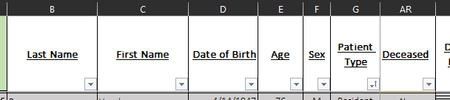
- Jul 14, 2023
You can use a variant of this:
=LET(
    ded, FILTER(B2:D5, AR2:AR5 = "Yes"),
    TAKE(ded, , 1) & ", " & CHOOSECOLS(ded, 2) & " " &
        TEXT(TAKE(ded, , -1), "mm/dd/yyyy")
)
i.e.
1. Filter the last name, first name and date of birth columns for those rows where column AR is "Yes".
2. Take the 1st column, concatenate a comma-space, concatenate the 2nd column, concatenate a space, concatenate the last column formatted according to your desired date format

flexyourdata
Jul 14, 2023Iron Contributor
You can use a variant of this:
=LET(
    ded, FILTER(B2:D5, AR2:AR5 = "Yes"),
    TAKE(ded, , 1) & ", " & CHOOSECOLS(ded, 2) & " " &
        TEXT(TAKE(ded, , -1), "mm/dd/yyyy")
)
i.e.
1. Filter the last name, first name and date of birth columns for those rows where column AR is "Yes".
2. Take the 1st column, concatenate a comma-space, concatenate the 2nd column, concatenate a space, concatenate the last column formatted according to your desired date format
 jaolveraJul 14, 2023Brass Contributorthank you so much!