Forum Discussion

Rodrigo_
Sep 16, 2024Steel Contributor
Formula (VBA generated) fills the entire column of selected cell
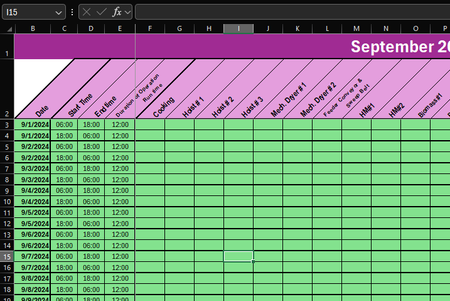
Hello everyone I'm currently experiencing an issue with my Excel (365). The code is supposed to insert a formula into a cell when I double-click it, but it fills the entire column of the selected ...

JKPieterse
Sep 17, 2024Silver Contributor
Rodrigo_ Your data is in a table. In tables it is good practice (as in many other areas of a spreadsheet) to have the same formula in all rows (one that can be copied across), rather than ad-hoc formulas all over the place. That being said, your problem is being caused by a setting that enforces this: If you type a formula in an empty column of a table, Excel automatically copies that formula to all cells of that column. That can be turned off (though I do not recommend it!):
Private Sub Worksheet_BeforeDoubleClick(ByVal Target As Range, Cancel As Boolean)
    Dim r As Integer
    If Not Intersect(Target, Me.Range("F3:R65")) Is Nothing And IsEmpty(Target.Value) Then
        r = Target.Row
        Application.AutoCorrect.AutoFillFormulasInLists = False
        Target.Formula = "=IF($C" & r & ">$D" & r & ",$D" & r & "+1-$C" & r & ",$D" & r & "-$C" & r & ")"
        Application.AutoCorrect.AutoFillFormulasInLists = True
        Cancel = True
    End If
End Sub
Rodrigo_
Sep 17, 2024Steel Contributor
The thing is, I've been using this data/table/format for a couple of years (using excel 2016-19) without this kind of problem, but when I switched M365 recently, it suddenly occurs. Don't know why..
- JKPieterseSep 18, 2024Silver ContributorWell, some behavioral changes are to be expected when switching to a new version.