Forum Discussion

Formula using ranged name in auto table
- Oct 30, 2024
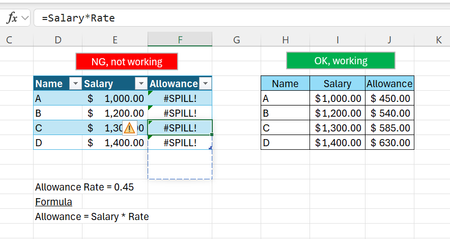
I guess Rate is named cell and Salary is named range in your case. In 365 =Salary*Rate returns spill, aka some range. In structured table into the table cell you may put only one value, not enough space for the range, thus error. Within the range on the right you return entire spill.
In 2016 so called implicit intersection works, only one value is returned to the cell which is related to current row.
Within structured table you may use =[@Salary]*Rate where the Salary is column name. Named range for it is not required.

I guess Rate is named cell and Salary is named range in your case. In 365 =Salary*Rate returns spill, aka some range. In structured table into the table cell you may put only one value, not enough space for the range, thus error. Within the range on the right you return entire spill.
In 2016 so called implicit intersection works, only one value is returned to the cell which is related to current row.
Within structured table you may use =[@Salary]*Rate where the Salary is column name. Named range for it is not required.

SergeiBaklan , you're right, Rate is named cell and Salary is named range, it brilliantly solved my problem~ thank you Expert! 😁
- SergeiBaklanNov 04, 2024Diamond Contributor
laucl , you are welcome