Forum Discussion

Formula to retrieve data from several sheets and return values from given criteria.
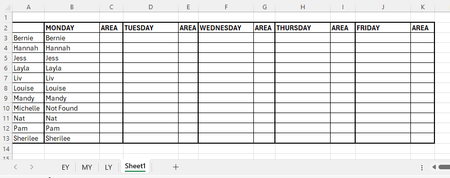

You should be able to nest a 3rd IfError statement for the sheet LY. Perhaps you were missing a comma or misplaced bracket close?
Replace the “Not Found” with:
IFERROR(VLOOKUP(A10,LY!$C$3:$G$33,2, FALSE),"Not Found")
The complete formula should look like:
=IFERROR(VLOOKUP($A10,EY!$C$3:$G$33,2, FALSE),IFERROR(VLOOKUP($A10,MY!$C$3:$G$33,2,FALSE),IFERROR(VLOOKUP($A10,LY!$C$3:$G$33,2,FALSE),"Not Found")))
To return the location instead, replace the IfError(…) (Do this if there is an error) with If(IsError(…)) Check if there is an error and if so do A and if not do B…
=If(IsError(VLOOKUP($A10,EY!$C$3:$G$33,2, FALSE)),If(IsError(VLOOKUP($A10,MY!$C$3:$G$33,2,FALSE)),If(IsError(VLOOKUP($A10,LY!$C$3:$G$33,2,FALSE)),”Not Found”,”LY”),”MY”),”EY”)
You’ll notice I added a $ in front of the A reference as your lookup cell column remains fixed if you are extending the formula to columns to the right. You may also wish to fix the lookup for the column to a set day of the week and remove the $ so that C$3:C$33 will become D$3:D$33 for the next day of the week if it follows on accordingly so that you can just extend the same formula to the right and have it adapt automatically.
ie. The column for Monday would have this formula:
=If(IsError(VLOOKUP($A10,EY!C$3:C$33,1, FALSE)),If(IsError(VLOOKUP($A10,MY!C$3:C$33,1,FALSE)),If(IsError(VLOOKUP($A10,LY!C$3:C$33,1,FALSE)),”Not Found”,”LY”),”MY”),”EY”)
And when extended to the right for Tuesday the range reference will auto change to D$3:D$33 and so forth for Wed - Fri.