Forum Discussion

marietuttle1973
Aug 02, 2024Brass Contributor
Formula to autofill a PO #
I have a workbook with 2 sheets. Sheet 1, column A is where the formula needs to go - based off the information in the sheet called Customer list. Example: Customer List - Column A is customer nam...
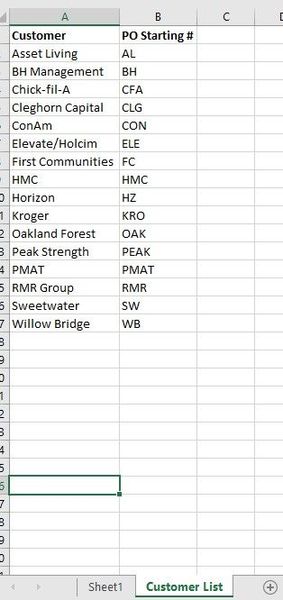

marietuttle1973
Aug 02, 2024Brass Contributor
So, it populated the first part of the PO from the Customer list, but didn't assign any numbers after it.

SergeiBaklan
Aug 02, 2024Diamond Contributor
Sorry, missed that. It could be
=IFNA(
  INDEX(
   'Customer List'!$B$2:$B$17,
    MATCH(Sheet1!$B2,'Customer List'!$A$2:$A$17, 0)
  ) &
  TEXT(
    IFERROR(RIGHT( LOOKUP(2, 1/($B$1:$B1=$B2), $A$1:$A1),3),0) + 1,
    "000" ),
 "---" )
and drag it down
Please note, numbers could change if you sort or insert/delete rows in the middle.
- SergeiBaklanAug 03, 2024Diamond Contributor
marietuttle1973 , you are welcome
- marietuttle1973Aug 02, 2024Brass ContributorThat worked perfectly. Thank you!