Forum Discussion

marietuttle1973
Aug 02, 2024Brass Contributor
Formula to autofill a PO #
I have a workbook with 2 sheets. Sheet 1, column A is where the formula needs to go - based off the information in the sheet called Customer list. Example: Customer List - Column A is customer nam...
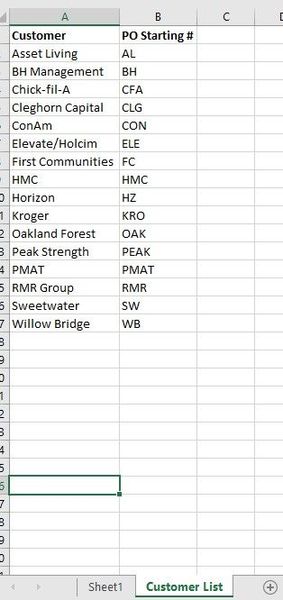

SergeiBaklan
Aug 02, 2024Diamond Contributor
New Excel functions are not available in Excel 2019. In your case in A2 it could be
=IFNA( INDEX('Customer List'!$B$2:$B$17, MATCH(Sheet1!$B2,'Customer List'!$A$2:$A$17, 0) ), "---" )and drag it down.

marietuttle1973
Aug 02, 2024Brass Contributor
So, it populated the first part of the PO from the Customer list, but didn't assign any numbers after it.
- SergeiBaklanAug 02, 2024Diamond Contributor
Sorry, missed that. It could be
=IFNA(
  INDEX(
   'Customer List'!$B$2:$B$17,
    MATCH(Sheet1!$B2,'Customer List'!$A$2:$A$17, 0)
  ) &
  TEXT(
    IFERROR(RIGHT( LOOKUP(2, 1/($B$1:$B1=$B2), $A$1:$A1),3),0) + 1,
    "000" ),
 "---" )
and drag it down
Please note, numbers could change if you sort or insert/delete rows in the middle.
- marietuttle1973Aug 02, 2024Brass ContributorThat worked perfectly. Thank you!
- SergeiBaklanAug 03, 2024Diamond Contributor
marietuttle1973 , you are welcome