Forum Discussion

Formula for tracking service intervals on running equipment
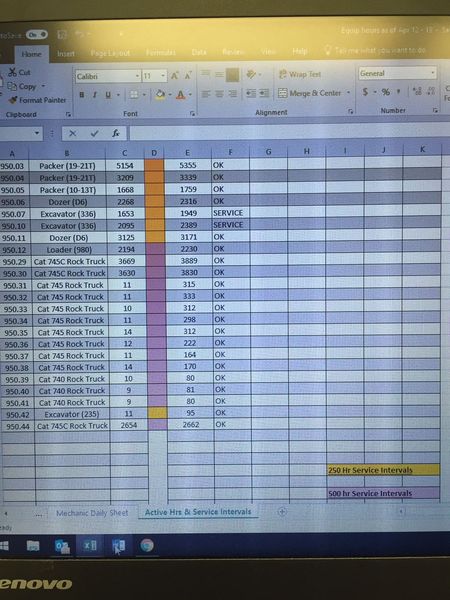

_BP_ ,
You don't need AND here, just
=IF((E30-C30<500),"OK","SERVICE")
and you may use conditional formatting to color your cells automatically depends on hours difference.
 _BP_Apr 25, 2019Copper Contributor
SergeiBaklan thank you for your prompt aide. Can you tell me what formula I would use to colour the column when Service is the result of the first formula? I am unclear where to even place the formula, nevermind how to scribe it.
BP
- SergeiBaklanApr 25, 2019Diamond Contributor
_BP_ , please check this post https://www.ablebits.com/office-addins-blog/2014/06/10/excel-conditional-formatting-formulas/comment-page-6/ how to work with conditional formatting.
Your formula could be like
=($E1-$C1)<500
for the one color, and similar one for another. Two colors - two rules.
If you provide small sample file I could illustrate details on it.
- _BP_Apr 25, 2019Copper Contributor
Sounds good, SergeiBaklan. Truly learning as I go. Thanks for the link. I will peruse it thoroughly. I'm looking to create a parameter that includes a 50 hr warning color prior to service being due as well. lol Big dreams. Green = OK, yellow = 50 hrs out from next service, red = SERVICE. I update the hrs weekly.