Forum Discussion

lbrosten
Oct 31, 2021Copper Contributor
Formula for selecting text based on conditions
In need of a formula for column C Risk Level which = The text representing the highest risk between Column A Audit Risk Level and Column B Perceived Risk Level For Example
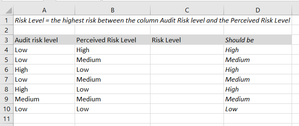
 Oct 31, 2021
=IF(OR(A4="High",B4="High"),"High",IF(OR(A4="Medium",B4="Medium"),"Medium","Low"))
Is this the formula you are looking for?

PeterBartholomew1
Oct 31, 2021Silver Contributor
As a 365 beta user, I set out to use Riny_van_Eekelen's idea of using the MAX function.
The function first looks up the text levels to turn them into values. Then to prevent MAX operating over the entire array, I introduced the MAP helper function
= LAMBDA(audit,perceived,
    LET(
      av, XMATCH(audit,RiskLevels),
      pv, XMATCH(perceived, RiskLevels),
      CritLevelλ, LAMBDA(a,p, MIN(a,p)),
      combined,   MAP(av,pv,CritLevelλ),
      INDEX(RiskLevels, combined)
    )
  )
to run through the arrays term by term. At present, such solutions are so unfamiliar that I have yet to come to a firm view as to their being over-complicated or just clear statements of fact.