Forum Discussion

lbrosten
Oct 31, 2021Copper Contributor
Formula for selecting text based on conditions
In need of a formula for column C Risk Level which = The text representing the highest risk between Column A Audit Risk Level and Column B Perceived Risk Level For Example
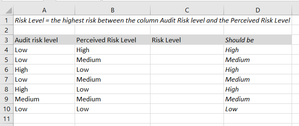
 Oct 31, 2021
=IF(OR(A4="High",B4="High"),"High",IF(OR(A4="Medium",B4="Medium"),"Medium","Low"))
Is this the formula you are looking for?
OliverScheurich
Oct 31, 2021Gold Contributor
=IF(OR(A4="High",B4="High"),"High",IF(OR(A4="Medium",B4="Medium"),"Medium","Low"))
Is this the formula you are looking for?
 lbrostenOct 31, 2021Copper Contributor
Thank you . Almost perfect. It's not working for the scenario where column A is a higher risk than column B.
- OliverScheurichOct 31, 2021Gold Contributor
Can you communicate the formula you entered?
The suggested formula works fine in all cases, see attached file.
- SergeiBaklanOct 31, 2021Diamond Contributor
If add helper range at any place of the workbook like
formula could be
=INDEX( $H$3:$H$5, MAX( XMATCH(A3:B3,$H$3:$H$5) ) ) - Riny_van_EekelenOct 31, 2021Platinum Contributor
lbrosten Excel can't really tell that the word "High" reflects a higher risk than the word "Low". Easier to use number values 1,2 and 3 for Low, Medium and High. The formula in C4 then could be =MAX(A4:B4)

