Forum Discussion

Formula: chose data from different tables based on cell selection
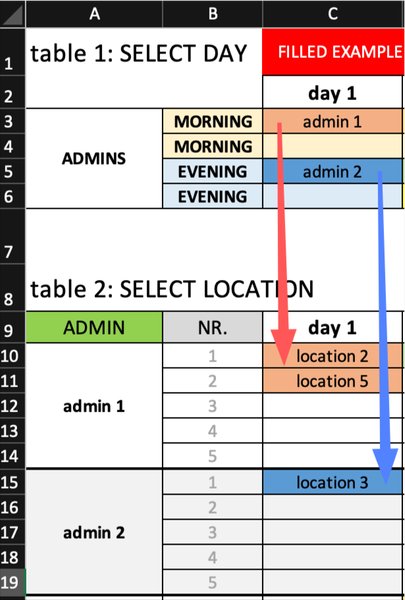
- Dec 17, 2022
this one is too complex for me. Need your help
I'm going to speak just for myself, here, but I suspect that others may share the sentiment. That may well be why after nearly 50 views of your appeal for help, you've had no replies. There are many of us here who love to help people (like you) figure out how to get from their raw data to the end product they need.
In your case, the elaborate color coding and multiple sheets actually serves to confuse me (and, I suspect, others). And your verbal descriptions of those sheets adds to the confusion more than it clarifies. (I DO realize you're doing your best to try to make things clear, so please excuse me for questioning what you've done)
I was the director of the HR and payroll database for a major corporation before I retired, so I do have experience dealing with multiple locations, people, pay, etc. You describe this as a "rental spreadsheet" yet at the bottom line (in the TOTAL sheet) it appears more to be about payment to people (Admin 1, 2, etc). I'm hoping you can clarify this apparent discrepancy.
What I'd also like you to do is put the spreadsheet aside. Over there on that table, out of sight.
Now describe in words, words only, what the raw data is (uncalculated) (the Input) (such things as):
- people
- roles
- places
- pay rates (if any, and how related to the above)
- relationships (if any) between Persons and Admins and Locations
- the assignments on Sheet1: you say "done manually" but is the expectation that they'll continue to be selected manually, or are you expecting a computer function or algorithm to make those entries? If so, what are the rules
- what informs the euro amounts that appear in Sheet 2's many boxes (is there an hourly rate somewhere, or does all that get entered as raw data with no table or set of "salaries" or "wages" behind it?)
And then, when all is said and done, what is the desired Output? Is it simply the data in this Sum column,
along with the corresponding identifiers in the Admin column?
Said another way, are all of the intervening columns in "final table: TOTAL" just details, stepping stones on the way to the SUM? Useful backup, perhaps.
I ask all this not to be a pain, but because my sense is that you're getting too far into the weeds too early, trying to design the spreadsheet based on how, say, one might have handled all the moving parts by means of paper ledger sheets. Yes, it IS complex when you lay it all out this way, but if we can step back from the weeds and just look at Input and Output, that might help us come up with simpler ways to handle the intervening steps.
I'm a firm believer in building a solid (and usually fairly simple) database (that's at the input end of things) and then letting Excel work its wonders on that database, adding payments per day per person per location over the period between day 1 and day 14. Excel can do that without visibly arraying the data as you've done--that kind of layout can, and often does, actually interfere with Excel's power to summarize data and produce the Output.
So, for example, a database that simply records, daily (or half-daily)
Date, Who, Where, Amount, (etc, other raw data as needed)
row after row after row
can be summarized by the feature known as the Pivot Table, by person, by day, with totals. Straight from transactional database (Input) to end result (OutPut) all by itself.
If, in other words, it is the case that your sheets 1 and sheet 2 represent raw data, generated on a transactional basis, you don't need to be filling in a ledger sheet (albeit a computerized ledger sheet); just record the raw data in a database or data table. Excel can handle the rest.
Again, forgive me for asking these. If you don't want to engage as I've suggested, that's fine...... I'll defer to others.

Thanks for explaining that. I do have at least one more question for now: is it possible for you to post a copy of the exported sheet--the one you get from that other system--just as it comes to you, before you do anything at all to it?
(Unfortunately, my main computer developed a problem this afternoon, so although I have a backup, the main one has the newer functions on it, and two screens. So I'm at a disadvantage when it comes to working on this; I'll do what i can)

Hello
Yes, I can attach the copy. Unfortunately they did not provide the content of the table, so I filled it with the same terminology as in my initial example. The table structure is untouched (rows and columns are in the same place).
As you can see, the first table ranges from A1:AH31. Second table from A3:AH63 and so on. It includes both morning and evening (left and right).
Maximum number of Persons is 30 in each table. Even if a total number of five persons are working, the export will generate all 30 rows (last 25 rows will be empty).
Please note that across all tables PERSON 1 is the same person and will appear always in the first row of each table. I mean that if PERSON 1 is called Maria, the name Maria will appear in the first row of all tables even if it does not have any entries in that table (as seen for example in table 2: rows 34 and 35 are empty).
This export is our starting point.
Let me know what you think. No worries about working on it. Maybe you can only give me some hints about how you would do it and then I can try my best to make it work.
Thank you.
- mathetesDec 20, 2022Gold Contributor
What does the 1.11 (in each and every cell that has an entry) mean?
That it appears as a constant value is very odd, for something purporting to account for varying amounts of work or revenue.
Why all the blank rows?
Are there in fact more people responsible, and this is just a sample? Or does the data generator just waste space?
How does the Admin get rolled into this?
Is it Admin 1 connected with Location 1, etc? But Persons can be at any location, under any Admin?
In other words, describe the relationships between these "moving parts."
- AlecsDec 21, 2022Brass Contributor
I have an update. My friend asked me to finish it as soon as possible because there will be no work from Friday on (holidays).
I have been working on it for a few days and found a solution that is not perfect but works properly. I used an additional Sheet and some extra tables that arrange the data from the exported Sheet in such a way that simple formulas could retrieve the values further and make all the calculations. I also kept an additional sheet where you can asign admins, people and locations as desired. If I only had had more time it might have been much cleaner (even better if we had found time to work together).
Thank you very much. I see your intention and I truly appreciate it. You're a good man. It was and always will be a pleasure to work with you on an excel table.- mathetesDec 21, 2022Gold Contributor
You're very welcome. I always enjoy working on projects like this--helping to make something work more smoothly, efficiently. Your project has more room to improve than many, in no small part because of the nature of that raw data that you are forced to begin with.
So more can be done, I'm sure. If after the holidays you want to pick it up again, I'll be around. Have a blessed holiday season.