Forum Discussion

rew1215
Jun 17, 2024Copper Contributor
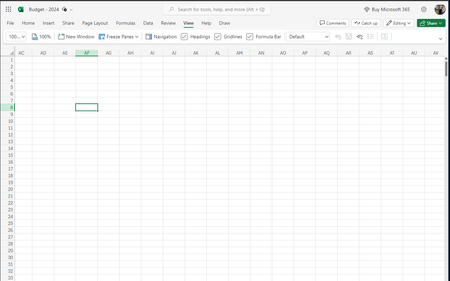
Formula Bar behind ribbon in Excel for web
For several weeks, on different computers and various sized monitors, I have been unable to access the formula bar when the ribbon is Always showing or Adjusting automatically, whether that ribbon is...

11GLO
Jul 03, 2024Copper Contributor
I had the same problem in a worksheet and found a workaround:
- In the bugged worksheet, in "View" tab, I unchecked "Formula Bar" (I don't know if this is relevant, I was trying to see if those view and ribbon/bars options were global or file specific)
- Closed the bugged worksheet
- I went to a folder shared to me (don't know if this is relevant) and opened another worksheet. This worksheet was already working properly.
- Went into the "View" tab and checked/unchecked the "Formula Bar". Closed the file.
- Reopened the bugged worksheet. Re enabled the formula bar and it worked
- In the bugged worksheet, in "View" tab, I unchecked "Formula Bar" (I don't know if this is relevant, I was trying to see if those view and ribbon/bars options were global or file specific)
- Closed the bugged worksheet
- I went to a folder shared to me (don't know if this is relevant) and opened another worksheet. This worksheet was already working properly.
- Went into the "View" tab and checked/unchecked the "Formula Bar". Closed the file.
- Reopened the bugged worksheet. Re enabled the formula bar and it worked