Forum Discussion

A2Z CF
Jul 23, 2022Brass Contributor
Formatting
Hi Everyone, I have the formula below in Column B2 which works fine. It interacts with Current Date in Colum A2 and a list of Holidays in Column C2 and provide five digits value that increase by 1 d...
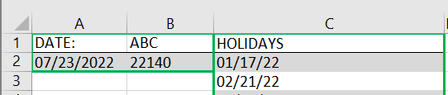
- Jul 23, 2022
Either set the number format to General and change the formula to
="="&NETWORKDAYS.INTL(DATE(2022,6,23),A2,1,$C$2:$C$14) +22119&","
or change the number format to the custom format =0\, and change the formula to
=NETWORKDAYS.INTL(DATE(2022,6,23),A2,1,$C$2:$C$14) +22119

HansVogelaar
Jul 23, 2022MVP
Either set the number format to General and change the formula to
="="&NETWORKDAYS.INTL(DATE(2022,6,23),A2,1,$C$2:$C$14) +22119&","
or change the number format to the custom format =0\, and change the formula to
=NETWORKDAYS.INTL(DATE(2022,6,23),A2,1,$C$2:$C$14) +22119
 A2Z CFJul 23, 2022Brass ContributorThank you so much! It works great now.