Forum Discussion

ky_fung
Aug 09, 2022Copper Contributor
Format of Date displaced in Excel cell
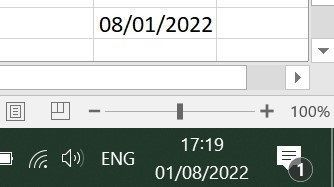
I want to store the current date in day/month/year format for later use with the code below: Sub ShowDate() Dim myDate As String myDate = Format(Now, "DD/MM/YYYY") ThisWorkbook.Sheets(1).Ra...

Jagodragon
Aug 09, 2022Iron Contributor
have the macro change the format of the cell.
I think it's this:
ThisWorkbook.Sheets(1).Range("R20").NumberFormat = "DD/MM/YYYY;@"
I think it's this:
ThisWorkbook.Sheets(1).Range("R20").NumberFormat = "DD/MM/YYYY;@"

ky_fung
Aug 09, 2022Copper Contributor
Thanks. But adding NumberFormat does not solve my problem.
Sub ShowDate()
Dim myDate As String
myDate = Format(Now, "DD/MM/YYYY")
Range("A1").Value = "Next Report Date = This Report Date + 7 "
Range("B2:B3").NumberFormat = "DD/MM/YYYY"
Range("A2").Value = "This Report Date: "
Range("B2").Value = myDate
Range("A3").Value = "Next Report Date: "
Range("B3").Value = DateAdd("d", 7, Range("B2").Value)
End Sub
I expect the followiing in column B, because my Region setting is English (United Kingdom)
10/08/2020
17/08/2020
The result is