Forum Discussion

Flag specific date records via Power Query
- Oct 15, 2020
tfmeier Played around with your files a bit and revised parts of the queries to arrive at a table "Merge1". Hopefully, it helps you exploring PQ further. You will notice that merging queries (the correct way) eliminates the need for VLOOKUP outside the PQ tables.
Just point the source for each of the queries to the files on your own system and you should be able to see the end result and follow through all the steps.


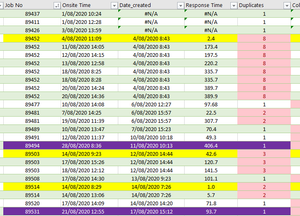
tfmeier I agree with Riny_van_Eekelen that a sample sheet and more info on exactly what you want would be helpful. That said and based on you looking for only the earliest case I will put out a thought. Apparently you already have a column "Duplicates" that appears to show a count of how many times that job no appears in the list (something like =countif(a:a,a1) but obviously not column A and maybe you are using Table structure references, which would be good. But let me ask why you want to show the total count? What if you changed it to =countif($A$1:$A1,A1) which would then count the duplicates (i.e. if there are 8 instances the first would be 1, the second 2, etc... Then your query can selectively pull only the 1s from that column. You could also check the above =1 to return Yes or No. If you want to know how many duplicate you could =countif($A$1:$A1,A1) & "of" & countif(A:A,A1) and it would display "1 of 8" but then the query would have to search for "1 of" because if you only look for starting with "1" then "10 of 12" would get pulled also.