Forum Discussion

Naren007
Mar 01, 2024Copper Contributor
Finding the highest selected choice
Greetings, Feedback will be triaged by consensus between 6 people. Each one can select as High(H), or Med (M), or Low (L) priority. I need to find out which priority level is selected the highest? ...
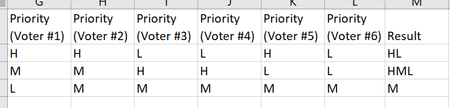
- Mar 01, 2024
365 solution:
=LET(
    GetResults, LAMBDA(row, LET(most_votes, MODE.MULT(CODE(row)), CONCAT(CHAR(most_votes)))),
    BYROW(vMatrix, GetResults)
)


djclements
Mar 01, 2024Silver Contributor
Naren007 If you have Excel for MS365, try the following:
=LET(
    arr, HSTACK("H","M","L"),
    qty, COUNTIF(G2:L2, arr),
    CONCAT(TOROW(IFS(qty=MAX(qty), arr), 2))
)
Or, to spill the results for the entire dataset, use the BYROW function:
=LET(
    arr, HSTACK("H","M","L"),
    BYROW(G2:L4, LAMBDA(r, LET(
        qty, COUNTIF(r, arr),
        CONCAT(TOROW(IFS(qty=MAX(qty), arr), 2))))
    )
)
MAX Priority Results
Please see attached...
 Naren007Mar 01, 2024Copper Contributor
Thx for the quick response and function works as intended.