Forum Discussion

Finding an appointment in Excel
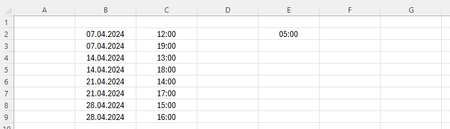
- Apr 05, 2024
Deleted
Here is a first attempt. It may need additional tweaking.
Do not change the formulas in column D.

Deleted
=LET(dates, UNIQUE(B2:B9), earliest, MINIFS(C2:C9, B2:B9, dates), FILTER(dates, earliest>=TIME(10, 0, 0)+E2))
Format the spill range of this formula as a date.
With slightly different data:
- DeletedApr 05, 2024Not applicable
Thank you very much, my landgenoot. This is already a great help! I've edited the file a bit. In E2 I now have the time, that I want to find an appointment for and in E3 I now have the minimum hours between the starts of appointments. The first question I have is, how can I change the formula in G2 so that when I enter e.g. 21:00 in E2, 28.04.2024 pops up in G2? The second question I have is, how can I change the formula in G2 so that when there are no results it says e.g. "No results" (instead of "#CALC!"). And the third question I have is, as you can I see I have added Sundays in May when I don't have appointments yet. How can I change the formula in G2 so that these open Sundays are included, as well? Thank you very much in advance!
- HansVogelaarApr 05, 2024MVP
Deleted
See the attached version. I used a helper column; it is undoubtedly possible without that column too but it'd be more complicated.
- DeletedApr 05, 2024Not applicableThanks again!
If I have 09:00 in D2, 10:00 in D3, and 17:00 in E2, it says "No results" in G2. However, as both 09:00 (D2) and 10:00 (D3) have 05:00 (E3) or more hours difference with 17:00 (E2), an appointment should be possible on this date.
A second question I have, how can I edit the formula in G2 so that it only lists dates within 365 days of today?
By the way, in D10:D13 I have entered 03:00 instead, so that appointments between 08:00 and 22:00 should be possible (when E3 remains 05:00).
Thank you in advance!