Forum Discussion

Finden und Ersetzten Standartwerte
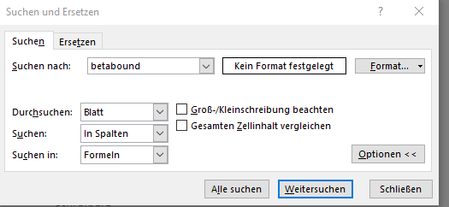
- Jul 02, 2021
For the Find dialog, use Application.Dialogs(xlDialogFormulaFind).Show with arguments as needed.
Arg1 is the text to search for.
Arg2 can have the following values: 1 = search in formulas, 2 = search in values, 3 = search in comments.
Arg3 can have the following values: 1 = find entire cells, 2 = find partial match.
Arg4 can have the following values: 1 = by rows, 2 = by columns.
Arg6 can have the following values: 1 = match case, 2 = case insensitive
So for example to search by columns:
Sub FindDialog()
    Application.Dialogs(xlDialogFormulaFind).Show Arg4:=2
End Sub
For the Replace dialog, use xlDialogFormulaReplace.
The arguments are the same, except that Arg2 is the 'Replace with' text. So to display the Replace dialog with search by columns:
Sub ReplaceDialog()
    Application.Dialogs(xlDialogFormulaReplace).Show Arg4:=2
End Sub

For the Find dialog, use Application.Dialogs(xlDialogFormulaFind).Show with arguments as needed.
Arg1 is the text to search for.
Arg2 can have the following values: 1 = search in formulas, 2 = search in values, 3 = search in comments.
Arg3 can have the following values: 1 = find entire cells, 2 = find partial match.
Arg4 can have the following values: 1 = by rows, 2 = by columns.
Arg6 can have the following values: 1 = match case, 2 = case insensitive
So for example to search by columns:
Sub FindDialog()
    Application.Dialogs(xlDialogFormulaFind).Show Arg4:=2
End Sub
For the Replace dialog, use xlDialogFormulaReplace.
The arguments are the same, except that Arg2 is the 'Replace with' text. So to display the Replace dialog with search by columns:
Sub ReplaceDialog()
    Application.Dialogs(xlDialogFormulaReplace).Show Arg4:=2
End Sub
Vielen vielen dank für die Antwort