Forum Discussion

KONG84
Jun 24, 2022Copper Contributor
FIND OUT START AND END DATE
Hi, I have been stuck at this part for a while, anyone have any idea to find out the start and end date for item B when it is in Japan? Was thinking minifs+hlookup .....
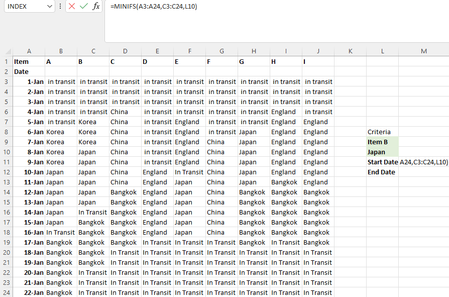
- Jun 24, 2022
With Excel 2021 you can get both dates spilled with a single formula
- Data formated as Table1
- Named M3 & M4 respectively CritItem & CritCountry (not mandatory)in M5:
=LET(
    ItemCol, INDEX(Table1,,XMATCH(CritIem,Table1[#Headers])),
    IF(COUNTA(CritIem, CritCountry) < 2, "",
        CHOOSE(SEQUENCE(2),
            MINIFS(Table1[Date], ItemCol, CritCountry),
            MAXIFS(Table1[Date], ItemCol, CritCountry)
        )
    )
)

Lorenzo
Jun 24, 2022Silver Contributor
Purely for the record the following also work as regular formulas assuming [Dates] are sorted as in your initial post
Start date
=INDEX(Table1[Date],
    MATCH(CritCountry,
        INDEX(Table1,,MATCH(CritIem,Table1[#Headers],0)),
        0
    )
)
End date
=LOOKUP(2,
    1/(INDEX(Table1,,MATCH(CritIem,Table1[#Headers],0))=CritCountry),
    Table1[Date]
)