Forum Discussion

KONG84
Jun 24, 2022Copper Contributor
FIND OUT START AND END DATE
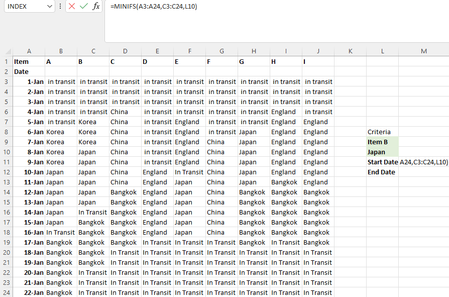
Hi, I have been stuck at this part for a while, anyone have any idea to find out the start and end date for item B when it is in Japan? Was thinking minifs+hlookup .....
- Jun 24, 2022
With Excel 2021 you can get both dates spilled with a single formula
- Data formated as Table1
- Named M3 & M4 respectively CritItem & CritCountry (not mandatory)in M5:
=LET(
    ItemCol, INDEX(Table1,,XMATCH(CritIem,Table1[#Headers])),
    IF(COUNTA(CritIem, CritCountry) < 2, "",
        CHOOSE(SEQUENCE(2),
            MINIFS(Table1[Date], ItemCol, CritCountry),
            MAXIFS(Table1[Date], ItemCol, CritCountry)
        )
    )
)


Patrick2788
Jun 24, 2022Silver Contributor
For those without access to dynamic arrays this might work. Ctrl+Shift+Enter to define as an array:
=MIN(IF(Table1[[A]:[I]]=CritCountry,IF(Table1[[#Headers],[A]:[I]]=CritIem,Table1[Date])))and
=MAX(IF(Table1[[A]:[I]]=CritCountry,IF(Table1[[#Headers],[A]:[I]]=CritIem,Table1[Date])))
 KONG84Jun 26, 2022Copper Contributor