Forum Discussion

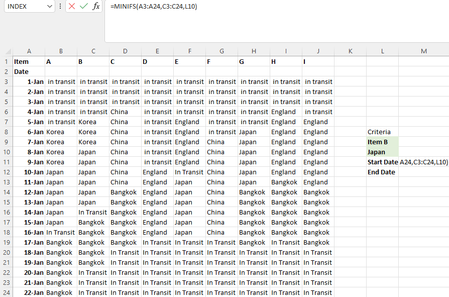
FIND OUT START AND END DATE
- Jun 24, 2022
With Excel 2021 you can get both dates spilled with a single formula
- Data formated as Table1
- Named M3 & M4 respectively CritItem & CritCountry (not mandatory)in M5:
=LET(
    ItemCol, INDEX(Table1,,XMATCH(CritIem,Table1[#Headers])),
    IF(COUNTA(CritIem, CritCountry) < 2, "",
        CHOOSE(SEQUENCE(2),
            MINIFS(Table1[Date], ItemCol, CritCountry),
            MAXIFS(Table1[Date], ItemCol, CritCountry)
        )
    )
)

Lorenzo
Hi, I’m using latest 2021 version excel.
This is a draft data as my company data is confidential but my actual data format is the same as what I posted on the forum, just that the name is changed. I will take your useful advice to set up in table form, but there are 100 items to track so I still need the function to help me work on it . To clarify, start date is earliest date and end date is latest date.

With Excel 2021 you can get both dates spilled with a single formula
- Data formated as Table1
- Named M3 & M4 respectively CritItem & CritCountry (not mandatory)
in M5:
=LET(
    ItemCol, INDEX(Table1,,XMATCH(CritIem,Table1[#Headers])),
    IF(COUNTA(CritIem, CritCountry) < 2, "",
        CHOOSE(SEQUENCE(2),
            MINIFS(Table1[Date], ItemCol, CritCountry),
            MAXIFS(Table1[Date], ItemCol, CritCountry)
        )
    )
)
- KONG84Jun 26, 2022Copper ContributorCan you explain ItemCol refer to which cell? Thanks