Forum Discussion

FIND OUT START AND END DATE
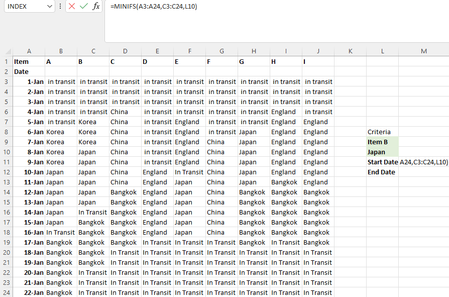
- Jun 24, 2022
With Excel 2021 you can get both dates spilled with a single formula
- Data formated as Table1
- Named M3 & M4 respectively CritItem & CritCountry (not mandatory)in M5:
=LET(
    ItemCol, INDEX(Table1,,XMATCH(CritIem,Table1[#Headers])),
    IF(COUNTA(CritIem, CritCountry) < 2, "",
        CHOOSE(SEQUENCE(2),
            MINIFS(Table1[Date], ItemCol, CritCountry),
            MAXIFS(Table1[Date], ItemCol, CritCountry)
        )
    )
)

Hi KONG84
- As asked in Welcome to your Excel discussion space! : what version of Excel do you run?
- Please confirm that Start date means the Earliest date and End date means Latest date
(Your sheet setup isn't ideal. Would be better if formatted as Table)
Thanks

Lorenzo
Hi, I’m using latest 2021 version excel.
This is a draft data as my company data is confidential but my actual data format is the same as what I posted on the forum, just that the name is changed. I will take your useful advice to set up in table form, but there are 100 items to track so I still need the function to help me work on it . To clarify, start date is earliest date and end date is latest date.
- LorenzoJun 24, 2022Silver Contributor
Good point from Patrick2788. If Dynamic Arrays not available, the following work as regular formulas (Enter only) with Excel >/= 2010
Start date:
=AGGREGATE(15,6,
    Table1[Date] / ((Table1[[#Headers],[A]:[I]]=CritIem) * (Table1[[A]:[I]]=CritCountry)),
    1
)
End date:
=AGGREGATE(16,6, Table1[Date] / ((Table1[[#Headers],[A]:[I]]=CritIem) * (Table1[[A]:[I]]=CritCountry)), 1 ) - LorenzoJun 24, 2022Silver Contributor
With Excel 2021 you can get both dates spilled with a single formula
- Data formated as Table1
- Named M3 & M4 respectively CritItem & CritCountry (not mandatory)in M5:
=LET( ItemCol, INDEX(Table1,,XMATCH(CritIem,Table1[#Headers])), IF(COUNTA(CritIem, CritCountry) < 2, "", CHOOSE(SEQUENCE(2), MINIFS(Table1[Date], ItemCol, CritCountry), MAXIFS(Table1[Date], ItemCol, CritCountry) ) ) )- KONG84Jun 26, 2022Copper ContributorCan you explain ItemCol refer to which cell? Thanks