Forum Discussion

Hogstad_Raadgivning
Apr 25, 2023Steel Contributor
Filter with dynamic list as an condition.
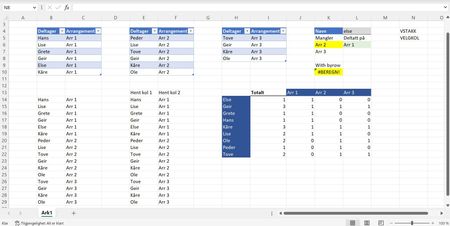
Hi, My goal here is to find which tables a name is in, and then which they are not in. It lists perfect if the name is in 1 tabler, or in all 3. But not if the name is in 2 tables. All 3...
 Apr 25, 2023
I've modified the existing formula slightly.
=LET(arrange,UNIQUE((CHOOSECOLS(B14#,2))),FILTER(arrange,ISERROR(XMATCH(arrange,L6#)),"Alle"))
The issue with the previous arrangement was when the number of elements being compared was not the same. The array with fewer elements threw an #N/A.
Patrick2788
Apr 25, 2023Silver Contributor
This could be folded down a bit but here's the idea:
=LET(
    stack, SORT(VSTACK(t_arr1, t_arr2, t_arr3)),
    participant, TAKE(stack, , 1),
    arrange, TAKE(stack, , -1),
    uArr, TOROW(UNIQUE(arrange)),
    header, HSTACK("", "Total", uArr),
    REDUCE(
        header,
        UNIQUE(participant),
        LAMBDA(a, v,
            LET(
                filtered, FILTER(arrange, participant = v),
                VSTACK(a, HSTACK(v, COUNTA(filtered), IFERROR(SIGN(XMATCH(uArr, filtered)), 0)))
            )
        )
    )
)- Hogstad_RaadgivningApr 25, 2023Steel Contributor
Thank you for your effort Patrick2788 But it is the formula in K6, the yellow one, which is the problem.
L6 and down list the tables the name is in. K6 and down should then liste the tables without the name in L4.
- Geir
- Patrick2788Apr 25, 2023Silver Contributor
I've modified the existing formula slightly.
=LET(arrange,UNIQUE((CHOOSECOLS(B14#,2))),FILTER(arrange,ISERROR(XMATCH(arrange,L6#)),"Alle"))
The issue with the previous arrangement was when the number of elements being compared was not the same. The array with fewer elements threw an #N/A.- Hogstad_RaadgivningApr 25, 2023Steel Contributor
