Forum Discussion

samery
Oct 26, 2023Tin Contributor
Filter function
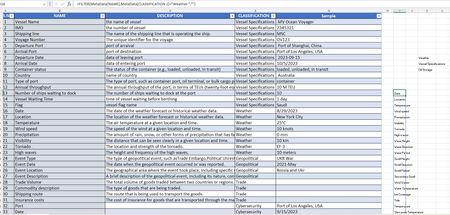
hi I have one table called metadata contains 3000+ rows of variables grouped in some classification. I want to use Filter function to return all variables from Metadata (Name + Description) wher...
- Oct 27, 2023
Riny_van_Eekelen That's quite the formula!
 I like it, although a simple COUNTIF or ISNUMBER/XMATCH with the parameters reversed will suffice...
=FILTER(MetaData[[NAME]:[DESCRIPTION]], COUNTIF(K7#, MetaData[CLASSIFICATION 1]), "") // OR: =FILTER(MetaData[[NAME]:[DESCRIPTION]], ISNUMBER(XMATCH(MetaData[CLASSIFICATION 1], K7#)), "")Cheers!

djclements
Oct 27, 2023Silver Contributor
Riny_van_Eekelen That's quite the formula! I like it, although a simple COUNTIF or ISNUMBER/XMATCH with the parameters reversed will suffice...
=FILTER(MetaData[[NAME]:[DESCRIPTION]], COUNTIF(K7#, MetaData[CLASSIFICATION 1]), "")
// OR:
=FILTER(MetaData[[NAME]:[DESCRIPTION]], ISNUMBER(XMATCH(MetaData[CLASSIFICATION 1], K7#)), "")
Cheers!

DaeyunPablo
Nov 23, 2023Brass Contributor
Neat! I've been using MMULT to create criteria arrays but this solution is much simpler