Forum Discussion

Fill out other cells based on selection
- Apr 27, 2026
Yes you can use SWITCH or you can have a table or Defined Names and use XLOOKUP (or other lookup option if you prefer). So commonly you would have a table either off to the side on this sheet or on another sheet and then use XLOOKUP to find the corresponding value:
=XLOOKUP( A2:A10, Ltable[ReviewSection], Ltable[ReviewSampSize], "")
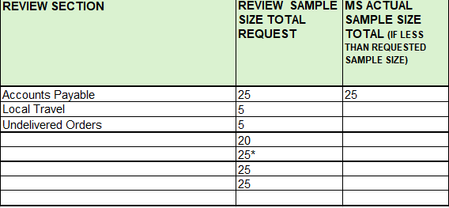
where A2:A10 are the values they enter from the drop-down in the Review Section, the Ltable[ReviewSection] is the column in the lookup table where the list of Review Sections is located, and the Ltable[ReviewSampSize] is the column in the lookup table where the 'Review Sample Size Total Request' values are located.
Then do the same for the MS Actual Sample Size.
If you prefer not having the lookup table on a sheet (note you could have it on another sheet and 'hide' that sheet) you could just create the Names and assign the array of values to each corresponding Name. But the table is easier to make and maintain.

Yes you can use SWITCH or you can have a table or Defined Names and use XLOOKUP (or other lookup option if you prefer). So commonly you would have a table either off to the side on this sheet or on another sheet and then use XLOOKUP to find the corresponding value:
=XLOOKUP( A2:A10, Ltable[ReviewSection], Ltable[ReviewSampSize], "")
where A2:A10 are the values they enter from the drop-down in the Review Section, the Ltable[ReviewSection] is the column in the lookup table where the list of Review Sections is located, and the Ltable[ReviewSampSize] is the column in the lookup table where the 'Review Sample Size Total Request' values are located.
Then do the same for the MS Actual Sample Size.
If you prefer not having the lookup table on a sheet (note you could have it on another sheet and 'hide' that sheet) you could just create the Names and assign the array of values to each corresponding Name. But the table is easier to make and maintain.

Ty, first time using xlookup. I did a table in another sheet and it worked like a charm. This will also allow me to expand as needed