Forum Discussion

FIFO Inventory Formula Challenge
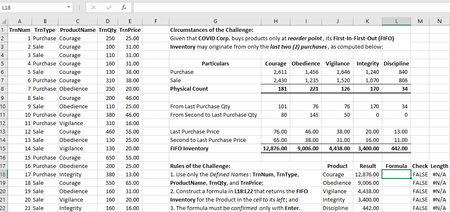

As I had previously advocated, traditional formulas are accessible to more users than modern Excel functions. For that reason, my formula challenges reach the widest possible audience, rather than a privileged few.
I simply adopted the adjective "traditional" mentioned by PeterBartholomew1 .
Perhaps, "traditional functions" would refer to those which are not available to non-Microsoft 365 users. Using LET is analogous to "legal cheating" for allowing the definition of names outside the Name Manager. For the purpose of my formula challenge, I will allow such, not because I allow cheating, but because it is legal.
- mathetesFeb 10, 2021Gold Contributor
Twifoowrote Using LET is analogous to "legal cheating" for allowing the definition of names outside the Name Manager. For the purpose of my formula challenge, I will allow such, not because I allow cheating, but because it is legal.
That's one way of looking at LET.
I was thinking of LET more as a way of using what we often refer to as "helper columns," just that all of those "helper columns" end up being incorporated into (or referenced within) a single formula. In fact, that has given me insight into how to use LET more extensively, whenever tempted toward the "helper column" approach.
- TwifooFeb 10, 2021Silver ContributorMy analysis of the LET syntax reveals that it defines a name for the value in an argument, then use such name in the main formula. If such value, which has now been defined as a name, won't be reused in the main formula, such definition becomes superfluous!
- mathetesFeb 10, 2021Gold Contributor
Twifoowrote, responding to my analogizing LET as a welcome variation (improvement) on helper columns, My analysis of the LET syntax reveals that it defines a name for the value in an argument, then use such name in the main formula. If such value, which has now been defined as a name, won't be reused in the main formula, such definition becomes superfluous!
And I fully agree. LET does in fact define a name for a value, often for the result of an independent calculation.
In doing that latter, it operates as an improvement on the less efficient, albeit probably easier-for-the-novice-to-follow use of helper columns. That was my only point; LET is a nice, and once grasped actually entirely intelligible, way to accomplish some remarkable combinations of calculations that hitherto were separated into multiple columns.
