Forum Discussion

Extracting the latest data
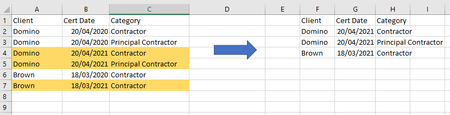
- Oct 08, 2021
RobMac14 Here you go. I've added some text boxes to explain what I've done, but as expected a combination of UNIQUE and FILTER (along with MAX) did the trick.

so mathetes already solved the problem in a cleaner way than I did but I will attach my solution. I didn't rearrange the columns, which caused part of the complexity and solved it in a single formula, which is more of the complexity:
=LET(input,A2:C7,uset,UNIQUE(INDEX(input,,1)&"@@@"&INDEX(input,,3)),clients,LEFT(uset,SEARCH("@@@",uset)-1),catagories,MID(uset,SEARCH("@@@",uset)+3,99),udate,MAXIFS(INDEX(input,,2),INDEX(input,,1),clients,INDEX(input,,3),catagories),CHOOSE({1,2,3},clients,udate,catagories))that said, I could suggest a slight improvement on mathetes solution by using this single array formula in column L (Cert Date):
=MAXIFS(C2:C7,A2:A7,INDEX(J2#,,1),B2:B7,INDEX(J2#,,2))

Great options. I never cease to be amazed at how many different ways Excel's many functions can be brought to bear on a single problem.
As an aside, your use of LET is impressive, here. (Although I did think that LET was used primarily to make formulas shorter!) [smiley face]
- mtarlerOct 08, 2021Silver ContributorI disagree a bit on that being the primary or most important use of LET but let me tell you that my formula was made significantly shorter using LET than the equation necessary if you substituted all the variables into their part (not to mention it probably wouldn't even work that way).
- mathetesOct 08, 2021Gold Contributor
Fair enough. I definitely overstated it with "primarily." Readability is another very important purpose served by LET, by naming things before you use them, especially results of formulas or functions that otherwise would be repeated... I love the results when I've used it, and did appreciate how you incorporated it so effectively to create a "one formula solution"!