Forum Discussion

RobMac14
Oct 08, 2021Copper Contributor
Extracting the latest data
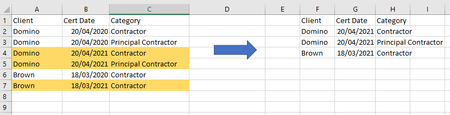
Hi I need to construct a data set from a data dump out of an database that will be loaded onto a webportal. At the moment, I have to do it manually, which is time consuming and I'm hoping that t...
- Oct 08, 2021
RobMac14 Here you go. I've added some text boxes to explain what I've done, but as expected a combination of UNIQUE and FILTER (along with MAX) did the trick.

mathetes
Oct 08, 2021Gold Contributor
If you have the latest version of Excel, you could use UNIQUE to get a list of unique clients, then FILTER to get the latest. Here's a video that explains those functions. https://www.youtube.com/watch?v=9I9DtFOVPIg
Since you went to the trouble to create a sample file to create an image, I or somebody else could demonstrate the steps if you'd just attach the actual Excel file you created.