Forum Discussion

POJ
Aug 30, 2025Copper Contributor
Extracting data from a matrix
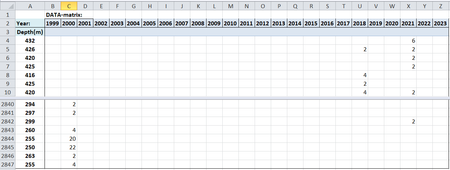
I have a matrix containing 4348 values distributed in a matrix Most of the cells in the matrix contians no values (are empty) Some cells contains values which I want to extract. The problem is how...

Kidd_Ip
Aug 30, 2025MVP
Concept like this:
- Install Power Query Add-In
- Load Your Matrix into Power Query
- Select your matrix and go to Power Query > From Table
- Make sure your matrix has headers (e.g. years) and row labels (e.g. depts)
- Unpivot the Data
- Select the column containing depths
- Right-click and choose Unpivot Other Columns
- Dept
- Attribute (year)
- Value
- In Power Query:
- This will convert your matrix into a table with:
- Rename Columns
- Rename “Attribute” to “Year”
- Rename “Value” to “Measurement” or whatever fits your context
- Filter Out Empty Values
- Use the filter dropdown on the “Value” column to remove null or empty cells
- Load the Clean Table Back to Excel
- Click Close & Load to insert the cleaned table into a new sheet
 POJAug 31, 2025Copper Contributor
Power Query worked well
Thank you for your help.
Kind Regards
POJ