Forum Discussion

GEEK_21
Oct 16, 2023Brass Contributor
Extract words from column A based on the list in column B | Solved
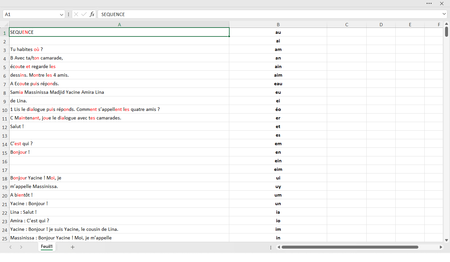
how to extract the red words in column A and sort them based on the list in column B
- Oct 18, 2023
Run this macro:
Sub ListWords()
    Dim rng1 As Range
    Dim rng2 As Range
    Dim cel1 As Range
    Dim cel2 As Range
    Dim wrds() As String
    Dim wrd As Variant
    Dim s As String
    Dim dct As Object
    Application.ScreenUpdating = False
    Set rng1 = Range(Range("A1"), Range("A" & Rows.Count).End(xlUp))
    Set rng2 = Range(Range("B1"), Range("B" & Rows.Count).End(xlUp))
    rng2.Offset(0, 1).ClearContents
    For Each cel2 In rng2
        s = cel2.Value
        Set dct = CreateObject(Class:="Scripting.Dictionary")
        For Each cel1 In rng1
            wrds = Split(cel1.Value)
            For Each wrd In wrds
                If InStr(1, wrd, s, vbTextCompare) Then
                    dct(wrd) = 1
                End If
            Next wrd
        Next cel1
        If dct.Count Then
            cel2.Offset(0, 1).Value = Join(dct.keys)
        End If
    Next cel2
    Application.ScreenUpdating = True
End Sub


Mike_Y_123
Oct 17, 2023Tin Contributor
do you want to check the words in column A, to see if they contain any of the values in column B...
If they do contain value/s then list them in column C?
Then sort the column C values? How do you want it sorted?
If they do contain value/s then list them in column C?
Then sort the column C values? How do you want it sorted?
- GEEK_21Oct 17, 2023Brass Contributor
no, I want to extract the words that contain letters in red from column A and then sort them based on the list in column B
Example: extract words that contain "au" and classify them in cell C1, "ai" sorts them in cell C2 and so on
