Forum Discussion

Extra Ghost Excel Screen
Recurring problem on several computers on several versions of MS Excel. Latest is version 2016. I often times get an extra full-screen blank excel. It's completely a blank frame not a blank sheet.
It interferes especially when trying to type formulas. I cannot close it because it is not considered a file but the application. I have looked for personal.xlsb, which I don't have in any startup folder. I have turned on and off DDE. I have done a full scrape off and reinstall and the behavior continues.
The only work around that works is to open the laptop monitor so I can move it out of the way. However, it will continue to get in the way. If I reboot i can go a while without experiencing it, but it always comes back to haunt me.
8 Replies
 Jim BachCopper Contributor
I've had this problem also . . .
I've tried all the various "things to try" that many people have posted here and elsewhere . . . all to no avail. No matter what I tried, the 'ghost' was always there IF I opened Excel full-screen (i.e. maximized). If I had foresight of mind to close Excel non-maximized, then when I'd re-open it things were fine (no ghost).
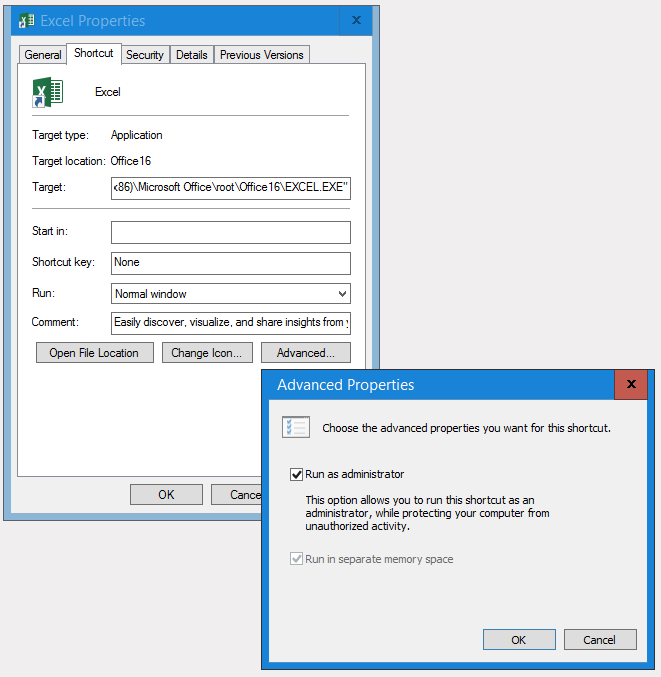
BUT . . . . what DID work for me . . . was setting the properties for the Excel icon (on my Quick Launch Bar, would be same for your desktop app-launch icon) to "Run As Administrator" . . . see attached screen-shot.
 Melanie TomitschCopper Contributor
I am crossing my fingers, but I started to notice a 'flash' related to duplicating windows and viewing on different screens. I updated my NVIDIA driver to the new package - the full packages don't seem to come over push mechanisms. And I have not seen the problem in the days since I upgraded.
- Damien_RosarioSilver ContributorHi Melanie
Does your workbook have Macros? It might be a window that is there to support that process?
Are you able to upload a sample so we can see?
Cheers
Damien- Melanie TomitschCopper Contributor
Well, I didn't have any of the personal.xls or other macros in any of the books.
However, it occurred to me that it was jumping to whatever monitior had the active window. I downloaded the new NVIDIA driver package - the big one, not the minor push updates - and haven't seen it since. That was only two days ago.
I was several versions of the software behind.
- Olaf HubelFormer Employee
Adding Prash_MSFT who might know what it is
 Peter CarlssonCopper Contributor
Did you find any solution for this issue?
- Melanie TomitschCopper Contributor
 RedcurryCopper Contributor
We had the same issue for over a year now but today my colleague has found the solution to this issue.
In our environment we have Ivanti / RES One running on Windows 10. This software blocks the Excel Add-Ins like Solver Add-In and Analysis Toolkit which Excel want to open in a hidden Excel worksheet.
In our case the solution is adding a REG-key / string under:
Computer\HKEY_LOCAL_MACHINE\SOFTWARE\WOW6432Node\RES\Workspace Manager\
with
Value name : AllowExcelMinimized
Value data : yes