Forum Discussion

Excel weird border question
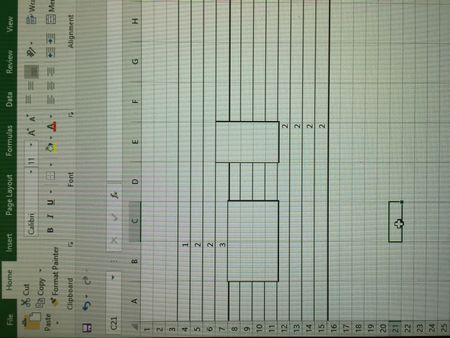

Thank you for your reply. Yes. New or existing, all workbooks. It disappears once I click away, for example to a different tab. Reappears every time I add something to a cell.

I see, strange. Googled a bit, some people reports the same e.g. https://stackoverflow.com/questions/46308435/excel-automatically-adds-borders-when-changing-cell-value
No conditional formatting, no VBA code. Have no idea what that could be. What i usually do in such situations
- check if the same is in safe mode (Win+R and "excel /safe"). If not when disable add-ins one by one if they affect;
- clean PC (CCleaner or like);
- repair Office
Other steps depends on situation. By the way, could you please attach any of your files where such effect appeared?
- gabriella koczianSep 21, 2017Copper Contributor
Thanks for looking into it. I'm about the wipe my laptop and start over!!
This is not something you can just learn to work with :)
Thanks again !
- SergeiBaklanSep 21, 2017Diamond Contributor
Quite risky, i'd play with other options first. Anyway, good luck!
 ewa.bucherSep 21, 2017Copper Contributor
Thank you for the response. I'm attaching one of the files. I sent it to my coworker and he had no problem with it.