Forum Discussion

Excel weird border question
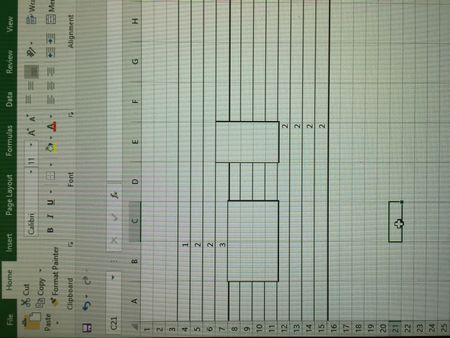

Hi Gabriella,
I don't know the answer, just to clarify - did i understood you correctly what if you open Excel with new workbook (not existing one), and add the number into any cell, this border appears?

Thank you for your reply. Yes. New or existing, all workbooks. It disappears once I click away, for example to a different tab. Reappears every time I add something to a cell.
- SergeiBaklanSep 20, 2017Diamond Contributor
I see, strange. Googled a bit, some people reports the same e.g. https://stackoverflow.com/questions/46308435/excel-automatically-adds-borders-when-changing-cell-value
No conditional formatting, no VBA code. Have no idea what that could be. What i usually do in such situations
- check if the same is in safe mode (Win+R and "excel /safe"). If not when disable add-ins one by one if they affect;
- clean PC (CCleaner or like);
- repair Office
Other steps depends on situation. By the way, could you please attach any of your files where such effect appeared?
- gabriella koczianSep 21, 2017Copper Contributor
Thanks for looking into it. I'm about the wipe my laptop and start over!!
This is not something you can just learn to work with :)
Thanks again !
- SergeiBaklanSep 21, 2017Diamond Contributor
Quite risky, i'd play with other options first. Anyway, good luck!