Forum Discussion

Shaqibiqbal007
Jul 22, 2022Tin Contributor
Excel Vlookup Error
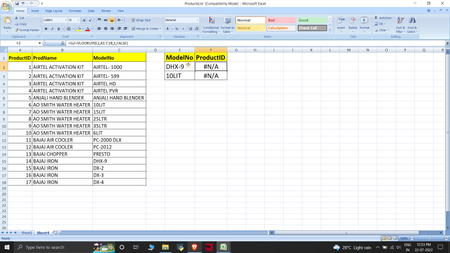
Hey, I am using excel 2007, and having a problem while performing Vlookup in my demo data, I am trying to find ProductId via ModelNumber, And when I am applying Vlookup to that value means on Model ...
 Jul 22, 2022
=INDEX($B$2:$B$8,MATCH(E2,$C$2:$C$8,0))You can do this with INDEX and MATCH.
=VLOOKUP(E2,CHOOSE({1,2},$C$2:$C$8,$B$2:$B$8),2,0)This is the alternative with VLOOKUP. Enter this formula with ctrl+shift+enter if you don't work with Office365 or 2021.
If you work with Office365 or 2021 you can use XLOOKUP.

MS_678
Jul 22, 2022Copper Contributor
Hello 🙂
The vlookup fonction use the first column by default to look for your modelNo.
You can try to change the order of your column for better results.
For more information about vlookup or alternative: https://support.microsoft.com/en-us/office/look-up-values-with-vlookup-index-or-match-68297403-7c3c-4150-9e3c-4d348188976b
The vlookup fonction use the first column by default to look for your modelNo.
You can try to change the order of your column for better results.
For more information about vlookup or alternative: https://support.microsoft.com/en-us/office/look-up-values-with-vlookup-index-or-match-68297403-7c3c-4150-9e3c-4d348188976b